
SEOForge vs RankYak
Both tools find keywords, write an article a day and publish it to your site, and both charge $99 a month for 30 articles. RankYak adds a backlink exchange and refreshes articles that lose ground. SEOForge starts smaller, at $29, and tracks your Google rankings and Analytics alongside your content.
Last checked against RankYak's public pricing and feature pages in November 2026.
Watch our RankYak review
Our founder, Ion-Alexandru, paid for RankYak and walked through it: onboarding, the keyword plan and the first article it wrote.
Published on YouTube, October 2026.
What we found
Select a time to watch that part of the video.
Setup understood the business
RankYak read the site and filled in a business description and target audience that were close to spot on, then suggested core topics to build around.
Some “low difficulty” keywords looked hard
The first planned keyword, around EHR integration, was marked low difficulty. In our experience it's one of the most competitive terms in that niche.
Some planned keywords overlap
It planned 39 keywords and grouped some of them, but pairs like “HIPAA compliant AI” and “HIPAA compliant AI agent” were left as separate articles that would compete with each other.
Backlinks wait until you pay
The backlink exchange stays closed during the trial and opens once you publish an article on a paid plan.
The article scored itself 100
RankYak gave its own first article a score of 100, which says little when it's graded against RankYak's own checklist.
No key takeaways at the top
The article opened with three paragraphs of introduction and no key takeaways, the part AI answers quote most often.
Good internal links, one outside source
It linked well to other posts on the site and included images and a table, but cited just one outside source (hl7.org), thin for a medical topic.
A clear call to action, but no FAQ or sources
The article ended with a useful next step for readers, but had no FAQ section and no list of sources.
Read the transcript
Hey everyone, if you don't know me, my name is Alex. I'm the founder of SEOForge.ai, and I've been in the SEO space for over 10 years now. I used SEO as a main growth channel to grow two of my previous startups, a B2C mobile application to over 200,000 users, and a B2B government contracting software to over 1,500 customers. Today we're reviewing RankYak. I came across this website, to be honest with you, I saw one of their ads on Facebook and I just wanted to check it out and show you guys exactly how it works and see if it's worth your time, if it's worth investing the effort to actually try this tool and use it on your website.
I'll actually go ahead and sign up for this thing, pay for it, and show you exactly how it works in this video. I've just signed up to RankYak. Let's see how it works. This is their onboarding process. I'm a business. Let's say that my company name is Sally. I'm gonna try it on a random website whose SEO I really, really respect. “Welcome to RankYak.” How did you hear about us? Well, it was Facebook. Let's get started. I'll just say Framer and then your domain.
Let's try this. Okay, now it's analyzing my website, target audience, language, and location. So it looks like RankYak actually gave me a description of the business. It's quite long, but I did skim through it and it looks pretty spot on. So we're gonna continue to the target audience. That is pretty spot on as well. And then the United States. English. We'll leave it at that. Let's see what happens next. I see it's generating core topics. I'm excited about this one. So it just generated the core topics that it believes, my website will benefit from.
And I think this one is a good one, this one is good, this one, definitely this one, and I would say that one. So that's 5 topics. I like this animation, that's pretty cool. Okay, so my growth plan is ready. So I see this is like their paywall, personalized growth plan, 30 SEO/GEO articles, 1 per day, keyword research. Publishing straight to your site, automatic content optimization driven by your Search Console data. I see your growth potential, the traffic, what's included.
Yeah, I mean, let's try it. Now let's see the main dashboard. So it's creating my content strategy, finding my best keywords, content calendar, writing your first article. Let's see the calendar. So the first keyword that it's targeting is EHR integration, HIPAA compliant, a receptionist, a voice agent for healthcare, low difficulty. I think that one is a high difficulty here, judging from experience. EHR integration is a very high difficulty keyword. EHR integration API, same thing here. Okay.
Those are not bad, keywords. This is pretty good. So yeah, I wonder, can I move them around? So it can swap. Yeah, yeah, okay. I like this. I'm really curious to see the first article. And while the first article is being generated, let's just check the other thing. So this is just a view of the actual keywords. So ready to plan. And so 39 keywords planned total. So that's about what, 40 articles, right? Okay, I kind of like the keywords here, but I also think it's very easy to cannibalize your own articles.
So cannibalization means when 2 or more of your pages are trying to rank for the same keyword. So for example, you have HIPAA compliant AI and then HIPAA compliant AI agent. That's actually very, very similar. So that can actually end up with you losing potential traffic and actual traffic just because you're having two or more articles competing for the same, keyword. So I think some of it could be improved, you know. I think that here and based on my own experience, you could have primary keyword and then secondary keywords and then have only one article target this group of keywords instead of just- yeah, you see, they've sort of done this like grouping, but then some of the grouping is not accurate.
So they've at least had an attempt at it. So the article is being generated, and then “your site can't join the backlink exchange yet. Publish an article to join.” So you need to actually start your trial in order to start getting backlinks. So let's see the calendar. It's still writing the article. I'll come back as soon as the article is generated, just so I don't waste your guys' time. So the first article has been generated, and I'm so excited to dig into it. It's quite funny. I mean, when the article is generated by the platform, you would of course give it a score of 100, right?
Because you're scoring it against the criteria you've made. So this one is a bit, I think, deceiving. And then I see it gives us the title and meta description. So the SEO title, it's good. I would recommend adding the year inside just to signal freshness, and specifically for AI search, adding the year in. So for example, saying EHR integration in 2026, right, what it means and how to do it right, that would actually be better because it will make AI chats cite you way more often.
And then the meta description is fine as well. Let's look at the article. Yeah, and then we have a link to another one of the blog posts. I like that. Okay, so the first thing that's missing here is you want to have a short introduction, like a paragraph usually. So for example, this is absolutely fine, but what this is missing desperately is key takeaways. So having 3 to 5 bullet points explaining exactly what your article is about actually helps with AI search specifically a lot. And the reason why is because studies show that when, you know, for example, ChatGPT or Claude, when one of the AI crawlers comes to your website, most of the citations that they put out in responses come from the first 500 words of the web pages they reference.
So if you add the most citable, the most interesting information in the top 500 words of your articles, you're way more likely to be cited in AI responses. So this article here is missing that. It's just giving 3 paragraphs in the introduction, no key takeaways. I see it generated this image. It's fine. I'm curious. I can replace it. Okay, that's cool. So I see a bullet point list, that's fine. I like this image, it's nice.
It looks a little bit AI-generated, but it's okay. And then a table too, I kind of like that. The one thing that I would say this article is missing overall, while I'm skimming through it: it's great that it's linking other blog articles from Sally's website. What's missing is actually linking to external websites. So for example, here you see there's a link right there, so it's linking to hl7.org, which is a reputable website. And you need to have more of this.
So when you make claims within your website, you need to prove that they come from reputable sources. And Google actually released an article recently that mentions that they don't really care so much if an article or content is AI-generated as long as the information is accurate. So you need to make sure that you show Google that the information you have is accurate by linking to reputable external websites. So government websites, organization websites, things like that. So it did it here once, but that's not enough for a medical article.
And then those are links to other blog posts, another image, “Common EHR integration challenges.”. I like that. Where to start. So that's sort of the CTA section, meaning if someone, you know, read all the way at the bottom, you wanna drive them along the funnel to the next step, which is this. So I like this. However, right here at the bottom, this article is missing two things, and one of them is crucial and the other one is really important but not so crucial. The first thing is there are no FAQs, so there is no frequently asked questions section at the bottom of the article in order to capture different types of typing in the same keyword, different intents.
So for example, let's say if someone searches for what are the common challenges for setting up an EHR integration, what's the best EHR integration, does Sally offer an EHR integration? So the main keyword here is EHR integration, but through the FAQs, what you do is you capture different ways that people type in this specific keyword, right? This topic, you can call it so. So this article is missing that. And second, like I mentioned, what's really important but not so crucial is a sources section.
So you want to show search engines and also human readers too that there's been research that went into writing this article. It looks like a research paper, right? And every research paper has a sources or references section at the bottom that says, hey, we've used those websites, those papers and journals in order to conduct our research and write this paper. The same goes for blog articles too. This is like one of my hacks that I use all the time. And in my experience it has been shown to increase your rankings and hence increase traffic because it really improves the trust signals and authority signals that you're giving to search engines as well as to human readers.
So I think this article is missing 3 crucial things. A key takeaway section in order to get more traffic from AI search like ChatGPT and Claude. A section at the bottom, an FAQ section at the bottom, so you can capture more AI search traffic too, because people type prompts, not keywords anymore. But also to type in the different ways that people can be typing the keyword into traditional search engines, and a sources section so you can show that, you know, there's been actual research done based on reputable sources into writing this article. So while I think the article is good overall, right?
It looks engaging with the pictures. It's really missing those 3 core things. And without those 3 core things, in my experience, you'll really be losing significant traffic. So now I would love to show you the platform that I've created and poured my 10+ years of experience in SEO and more recently AI search that does those 3 crucial items for you and more. And like I've mentioned in the beginning of the video, I'm the founder of SEOForge.ai and I've taken my 10 plus years of experience in SEO and applied them to the platform so you can get the most value out of it. I would love to show you how it works.
So first of all, the main difference is the fact that we actually generate a full content plan for you for the next three months. We don't just show you the next five articles we'll write for you. That's just random keyword targeting and that just doesn't work anymore. But what we actually do is we build topic clusters. So. You give us your website, we identify 600 keywords that are high intent for your business, and then we use those 600 keywords to actually create, let's say 90 to 100 or 120 article ideas. And we group those article ideas into topic clusters, meaning there will be a specific strategy and plan as to how we do internal linking between those articles, what external articles and sources will link to, and so on.
And now let me show you exactly how an article that we generate looks like. So this is one of the article examples that we've generated for this website in the AI, healthcare space. And you can see here, I mean the article is just way more comprehensive. We don't like using stock images or a generated stock images. We like creating charts, infographics, things that people will find super useful. And also they will help you get more traffic from people who are searching for images to use in presentations, social media posts or anything like that. These are really valuable images. It's not just, you know, fluff placeholder images.
And then we realized from our research that LLMs, AI search engines like Claude and ChatGPT, they usually cite the information from the top 500 words of each web page. So if you want to get more traffic from AI search, which actually is shown to convert at a way higher rate, you will need to include your key insights, data, unique perspectives in the top 500 words of each blog article. So this is why every article comes with a key takeaway section where we do exactly this. And this has worked amazing for some of our customers who are actually getting confirmed, incredibly more AI citations than before.
Our articles also come fully optimized for SEO and GEO with meta descriptions, meta titles and featured images. Like I mentioned, we don't like creating fluffy images. Every image is on brand and provides actual value. So you can get more traffic from Google, image search and other sort of image search engines. And every article also comes with an FAQ section so you can capture more intent from that keyword. So let's say if in this case the main keyword we target is healthcare AI platform, well, someone will just search on Google healthcare AI platform, someone will search.
What is the best healthcare AI platform? Someone will search, how do you handle AI safety in healthcare platforms? So in order to capture all those intents and all those queries together, this is exactly why we have the FAQ section. Because the FAQ section helps capture and target all those queries around the main keyword. And apart from that, we don't just have an FAQ section, right? We have more than that, we have a sources section. So the sources section shows that this article was actually thoroughly researched and it's not just some AI slop and fluff, that was just generated, but there has been some actual thinking and reasoning behind this article.
And this is super useful because it shows traditional search engines, AI search engines and human readers that hey, the team behind this article actually did thorough research and they came up with a good article. It's not just fluff and we also like to include, just above the Sources section, a CTA section. And I think this is super important. And most people actually skip this. But imagine that someone comes, reads most of your article, or skims to read, goes all the way to the bottom of the page, and you do nothing with that. I mean, will you just let them leave the website and go to someone else? Go to, potentially one of your competitors? No, you should have a clear CTA section.
And the catch here is that the CTA section in each article needs to be contextual to that article. Because if a person comes and searches for the best healthcare platform, you specifically need to have your CTA section. Talk about that and what makes you the best platform and the best solution for what they're looking for. And I mean, the results speak for themselves. We have the website here that's about AI healthcare automations. And as you can see, using SEOForge.ai, it managed to get 2.6K AI citations, as confirmed by Bing Webmaster Tools from Microsoft Copilot in the past three months.
I mean, that's just incredible. 2.6K citations, in fact. Just because I know the customer, they've managed to drive over 80 leads from this alone. And it doesn't just stop here. We also track their Google search console, and as you can see, in three months as well, they've managed to drive over 300 clicks and 56,000 impressions with an average position of seven. So if you can imagine, their blog articles are actually ranking on the first page of Google after three months, after just registering their domain in a very competitive space. This is super, super amazing. And So like I mentioned before, the platform is called SEOForge.ai. We're a super small team and we're trying to build something incredibly valuable.
This is why our article generator doesn't just take the top performing Google search results, it actually scans for public databases, for data online. It collects that data, it looks at research papers if it needs to. It tries to find unique insights, unique perspectives, unique data in different places, brings all of that together using our research agent, and then creates a deeply researched and just insightful and interesting article for both human readers and AI agents. My name is Alex and I'm so thankful for you for watching this video. If you have any questions for me, if you have any feedback, if you want to check us out, you'll find the 20% off for life discount code in the description and feel free to always reach out to me.
I genuinely want to see you succeed. Thank you so much for your attention and I'll see you in the next video.
Choose SEOForge if you want…
- To start small: 5 articles a month for $29, instead of a $99 minimum
- A rank tracker for the keywords you choose, checked weekly on desktop and mobile
- Search Console and Google Analytics in one place, with a chat you can ask about them
- Articles that open with key takeaways and end with an FAQ and sources
- Several sites on one plan: 100 articles across 5 sites for $399, where RankYak charges $99 per site
RankYak may suit you better if…
- You want a backlink exchange included in the price
- You want articles refreshed automatically when Search Console shows them slipping
- You need more than 30 languages (RankYak lists 40+)
- You publish to Webflow or WordPress.com, or through Zapier or Make
- You want an assistant that makes changes to your plan and articles for you
SEOForge vs RankYak: feature by feature
RankYak's column is based on its public website. Where it doesn't mention a feature, we say so rather than assume it's missing.
| Feature |  SEOForge |  RankYak |
|---|---|---|
| Content | ||
| Automatic keyword research & content plan | Built in Builds a keyword-based content plan from your site, audience and competitors | Built in Keyword discovery, competitor analysis and a topical map, planned monthly |
| AI article writer | Built in Long-form articles with images, written in your brand voice | Built in Researched from live search results, up to 5,000 words, with cited sources |
| Articles per month | 5, 30 or 100, depending on the plan | Up to 30 per site (one per publishing day) |
| Images in articles | Built in | Built in Generated images, plus YouTube embeds |
| Refreshes articles that lose ground | Not automatic Its MCP server finds declining pages and plans the refresh | Built in Rewrites slipping articles on the same URL, using Search Console data |
| Languages | 30+ languages | 40+ languages |
| Publishing | ||
| Auto-publish to your CMS | WordPress, Shopify, Wix, Framer, plus webhooks for any other site | WordPress, WordPress.com, Shopify, Webflow, Wix, Zapier and Make, plus API, webhooks and RSS |
| Measuring results | ||
| Google rank tracking | Built in Weekly Google positions, desktop and mobile (25 / 50 / 100 keywords by plan) | Not listed No tracker for chosen keywords listed; uses Search Console data |
| Search Console & Google Analytics | Built in Search Console and Google Analytics dashboards built in | Search Console steers the plan and refreshes; Google Analytics not listed |
| AI assistant | Built in Ask questions about your traffic in plain English, with saved chat history | Built in Yuno, a copilot that answers questions and makes changes to your plan and articles |
| Fixes for existing pages | Not automatic Its MCP server finds low click-through and cannibalized pages | Built in Site Guard add-on ($99/mo): titles, descriptions, click-through rate and cannibalization |
| Links | ||
| Backlink monitoring | Built in Backlinks, referring domains and broken links | Not listed Only the links placed by its exchange are tracked |
| Backlink exchange | Not offered | Built in Vetted sites in your niche; opens once your subscription starts, after the trial |
| Plans & access | ||
| Starting price | $29/mo 5 articles | $99/mo 30 articles, one site |
| MCP server & API | Built in MCP server and REST API on every plan | Built in MCP server and REST API |
| Extra websites | Up to 5 sites on Pro ($399) | $99 a month for each site |
| Free trial | 3 days | 3 days |
Pricing compared
At 30 articles a month the two cost the same: $99. SEOForge also has a $29 plan for 5 articles. RankYak charges $99 for every website, so five sites cost $495 a month; SEOForge Pro covers 5 sites with 100 articles for $399.
SEOForge
Starter
5 AI-written, SEO-optimized articles per month
$29/mo
Premium
30 branded articles a month generated and published on auto-pilot
$99/mo
Pro
100 articles per month across 5 client projects
$399/mo
3-day free trial on every plan. Cancel anytime.
RankYak
RankYak Pro
Per website. Up to 30 articles a month, backlink exchange, 40+ languages
$99/mo
Site Guard add-on
Checks chosen pages daily for weak titles, descriptions and lost clicks, and finds cannibalized pages
$99/mo
Paying yearly gives you 2 months free ($82.50 a month). The plan starts with a 3-day free trial, and the backlink exchange opens once the paid subscription starts. Agencies pay the same $99 for each client site.
The differences that matter
You can start for $29
RankYak has one plan: $99 a month per site for up to 30 articles. SEOForge's Starter plan gives you 5 articles a month, keyword research and rank tracking for $29, so you can see whether SEO works for your business before committing to more.
Track the keywords you care about
SEOForge checks your Google positions every week, on desktop and mobile, for the keywords you choose (25, 50 or 100 by plan). RankYak works from Search Console data, which only covers searches where your site already appears, and doesn't list a rank tracker.
See visitors and signups, not just clicks
SEOForge brings in both Search Console and Google Analytics, so you can see which articles bring visitors and signups, and ask questions about it in plain English. RankYak uses Search Console to steer its plan and refreshes; its site doesn't mention Google Analytics.
Five sites for less
SEOForge Pro is $399 a month for 100 articles across 5 sites. RankYak charges $99 for each site, so five sites cost $495 a month, with up to 30 articles each.
Articles come with key takeaways, an FAQ and sources
In our test, RankYak's article had good internal links, images and a table, but only one outside source, no key takeaways, no FAQ and no list of sources, although its site describes cited sources. Every SEOForge article opens with key takeaways and ends with an FAQ and a list of sources, with links to your other pages throughout.
Where RankYak is ahead
RankYak includes a backlink exchange, rewrites articles that start losing ground on the same URL, and writes in 40+ languages, with articles up to 5,000 words and cited sources. It publishes to Webflow and WordPress.com, and connects to other apps through Zapier and Make. Its Yuno copilot can change your plan and articles for you, and the Site Guard add-on fixes weak titles and descriptions on pages you already have. If you want all of that for one site, it's a reasonable choice.
What SEOForge customers say
Real results from businesses growing with SEOForge.

Sean
Founder, SaaS Startup
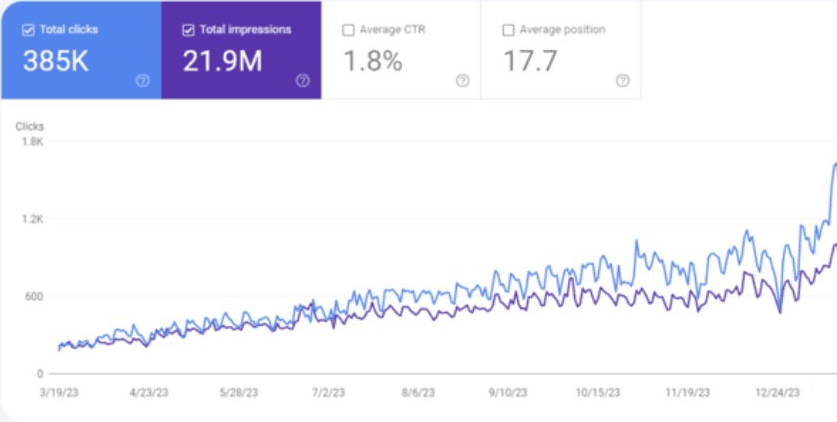
“We went from page 5 to the top 3 on Google and ChatGPT started recommending us to people. Revenue followed naturally.”

Ralph
Digital Marketing Manager

Naman Jain
Growth Engineer at HackHabits
“SEOForge helped me rank for my main keywords on ChatGPT. Traffic is increasing, and all that on auto-pilot. Really really good!”

Rick
Founder, Ecommerce Store

Christian
President, Local Service Business
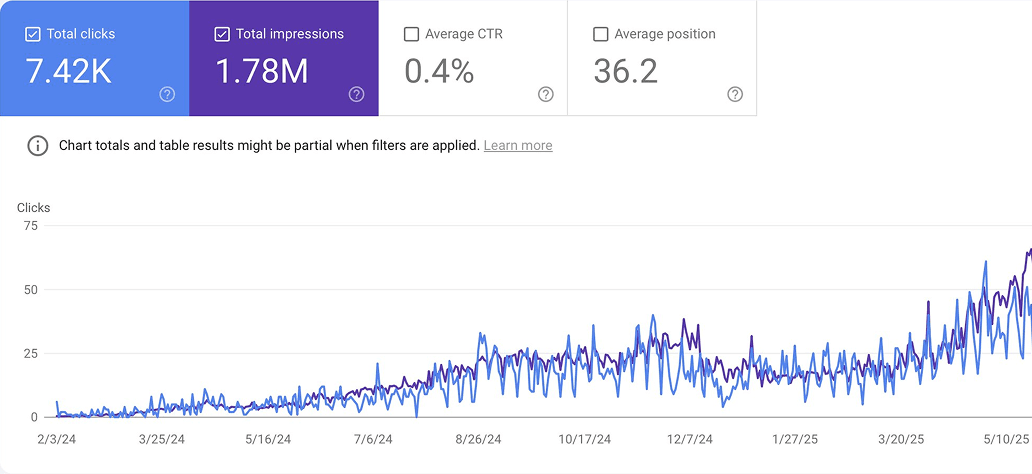
“SEOForge takes care of everything: keyword research, content, backlinks. The 90-day content plan was spot on from day one.”

Jack
Co-Founder

Touqeer
Growth Lead
“We replaced our $5k/month content agency with SEOForge. Better results, 10x cheaper, fully on auto-pilot.”

Brandon
Founder, Local Service Business
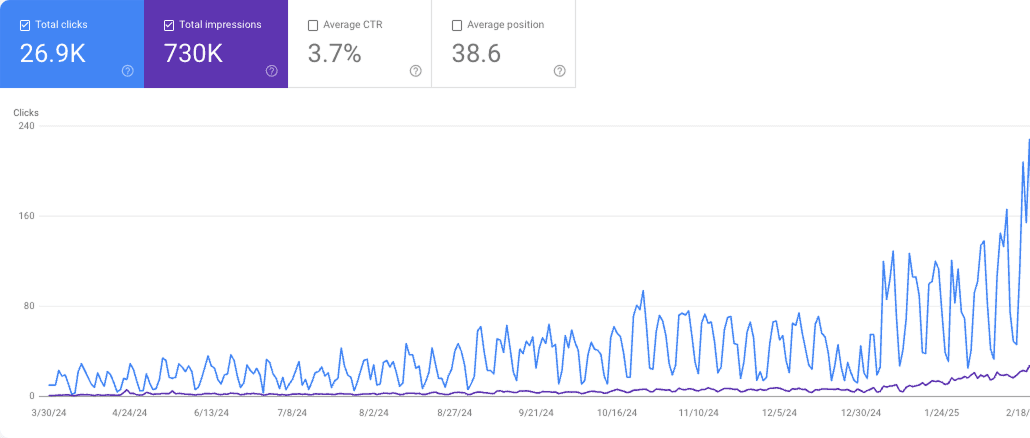
“We went from 0 to 100+ AI citations in 3 months. The automated strategy is leagues ahead of what we did manually.”

Scott
Growth Marketer

Kaytelynn
Founder & CEO, Online Beauty Brand

Chris Rauch
Founder
“As a founder in ecommerce, I've never seen this level of actionable SEO & AI intelligence anywhere else, highly recommend it.”

Alessandra Denes
Founder at Nails Hunt
“It made SEO & GEO 10x easier for us and lead to real results! We 2x'd our ChatGPT traffic and 4x'd our Google traffic.”
SEOForge vs RankYak: FAQ
At 30 articles a month they cost the same: $99. SEOForge is cheaper to start with, at $29 for 5 articles, and cheaper for several sites: Pro is $399 for 100 articles across 5 sites, while RankYak charges $99 per site ($495 for five).
Yes. Our founder paid for RankYak in October 2026 and walked through onboarding, the keyword plan and the first article. Setup understood the business well, but some planned keywords overlapped, and the article had no key takeaways, FAQ or sources and only one outside link. The full walkthrough is in our video review on this page.
It uses Google Search Console data to plan articles and spot ones that are slipping, but its website doesn't list a rank tracker for keywords you choose, or a Google Analytics integration (checked November 2026). SEOForge includes weekly Google rank tracking on desktop and mobile, plus Search Console and Google Analytics dashboards.
Yes. Its backlink exchange places links from vetted sites in your niche, with the same site linking to you at most once a month. It opens once your paid subscription starts, after the trial. SEOForge doesn't build backlinks; it monitors the backlinks, referring domains and broken links you already have.
RankYak publishes to WordPress, WordPress.com, Shopify, Webflow and Wix, connects to other apps through Zapier and Make, and offers an API, webhooks and RSS. SEOForge publishes to WordPress, Shopify, Wix and Framer, and to any other site through webhooks.
Yes. Every SEOForge plan includes an MCP server and REST API, so you can ask about your rankings, traffic and content plan from Claude, Claude Code, Cursor or any MCP-compatible tool. RankYak also has an MCP server and REST API.
Yes. Every plan starts with a 3-day free trial, and you can cancel anytime during the trial.
Try the RankYak alternative that starts at $29
Connect your site, and SEOForge builds your keyword plan and drafts your first articles in your brand voice. Try it free for 3 days.
More comparisons
See all comparisons
Tools to consider instead
RankYak alternatives
Seven tools that write and publish SEO articles, from $29 a month, compared on price, publishing and rank tracking.

Head-to-head comparison
SEOForge vs Outrank
Both write and publish SEO articles on autopilot. SEOForge starts at $29 and shows you the results in the same tool.
Tools to consider instead
Outrank alternatives
Seven tools that write and publish SEO articles, from $25 a month, compared on price, publishing and rank tracking.

Head-to-head comparison
SEOForge vs BabyLoveGrowth
Both write and publish SEO articles on autopilot. SEOForge starts at $29 and tracks your Google rankings for the keywords you choose.
Tools to consider instead
BabyLoveGrowth alternatives
Seven tools that write and publish SEO articles, from $29 a month, compared on price, publishing and rank tracking.

Head-to-head comparison
SEOForge vs Distribb
Both write and publish SEO articles on autopilot. SEOForge starts at $29 and tracks your rankings and analytics in the same tool.
RankYak information comes from its public website, checked in November 2026. Prices and features change, so check rankyak.com, RankYak pricing, RankYak backlink exchange for the latest. Spotted something out of date? Email support@seoforge.ai and we'll fix it.
RankYak is a trademark of its owner. SEOForge is not affiliated with or endorsed by RankYak.