
You can publish the best content on the internet, but if your on-page elements are off, search engines will struggle to understand what your page is about, and searchers will scroll right past it.
On-page SEO is the practice of optimizing individual web pages to rank higher and earn more relevant traffic. It covers everything you directly control: title tags, meta descriptions, headings, content structure, images, and internal links. If you're still getting familiar with how SEO works, on-page optimization is one of the most immediate ways to improve your visibility.
The honest answer is that most on-page issues are straightforward to fix. The challenge is remembering to check everything consistently, especially when you're publishing at scale. That's what this checklist solves.
Below, every item is tagged with a priority level so you know where to focus first:
- Essential - Must have. Fix these before anything else.
- Important - Should have. Address these for meaningful gains.
- Nice to have - Polish items that separate good pages from great ones.
Key Takeaways
- Title tags and meta descriptions are your first impression: They directly influence click-through rates, and a 2025 study found Google rewrites roughly 76% of title tags that don't follow best practices (Search Engine Land).
- Structure your content with a clear heading hierarchy: One H1 per page, logical H2/H3 nesting, and keywords placed naturally in headings help both readers and crawlers.
- On-page SEO is about users and search engines simultaneously: Every optimization should improve readability and usability, not just target an algorithm.
- Prioritize ruthlessly: Not every item carries equal weight. Title tags, headings, and content quality matter far more than nice-to-have enhancements like schema markup.
- Internal links are underrated: They guide both visitors and search engines through your site, distributing authority to the pages that need it most.
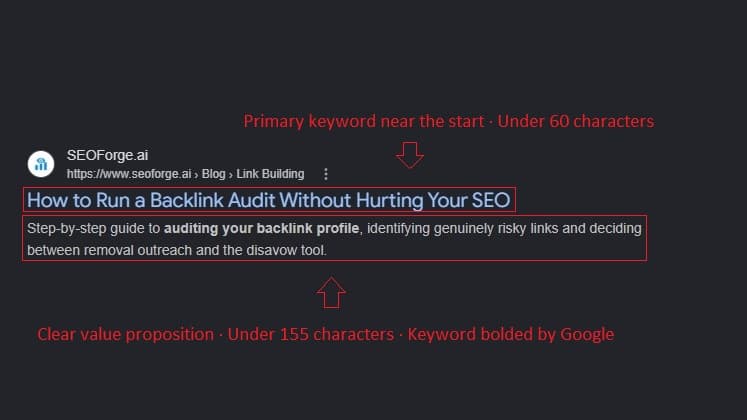
Essential: Title Tag Optimization
Your title tag is one of the strongest on-page signals you can control. According to Google's Search Central documentation, title tags are critical for giving users a quick insight into what a result is about and why it's relevant to their query.
Research from Backlinko's analysis of 4 million search results found that title tags between 40 and 60 characters tend to earn the highest organic click-through rates (Backlinko). Meanwhile, a 2025 study published on Search Engine Land found that Google rewrites approximately 76% of title tags, often because the originals were too long, keyword-stuffed, or misaligned with the page content (Search Engine Land).
Here's what this looks like in practice:
- Include your primary keyword, ideally near the beginning
- Keep the title under 60 characters to avoid truncation
- Make it compelling enough to earn a click, not just rank
- Ensure every page on your site has a unique title tag
- Match your title tag closely to your H1 heading (this reduces the chance Google rewrites it)
Common mistake: Stuffing multiple keywords into one title. Google's own guidance warns that keyword stuffing in titles can make results look spammy to both users and the algorithm (Google Search Central).
Essential: Meta Description
Meta descriptions don't directly affect rankings, but they significantly influence whether someone clicks your result. Google's SEO Starter Guide describes them as a short summary that acts like a pitch to convince users your page is what they're looking for (Google Search Central).
You can test how your meta description will look in search results using a SERP simulator before publishing.
- Include your primary keyword naturally (Google often bolds matching terms)
- Keep it under 155 characters
- Include a clear call-to-action or value proposition
- Accurately describe the page content (avoid clickbait)
- Write a unique description for every important page
Need help generating descriptions? Try our free meta description generator to draft options quickly.
Essential: URL Structure
Clean URLs help both users and search engines understand what a page is about before they even visit it. Backlinko's CTR research found that URLs containing a keyword relevant to the search query had a 45% higher click-through rate than URLs without one (Backlinko).
- Keep URLs short and descriptive (e.g.,
/blog/on-page-seo-checklist) - Include your primary keyword
- Use hyphens to separate words (not underscores)
- Avoid unnecessary parameters, session IDs, or numbers
- Use lowercase letters consistently
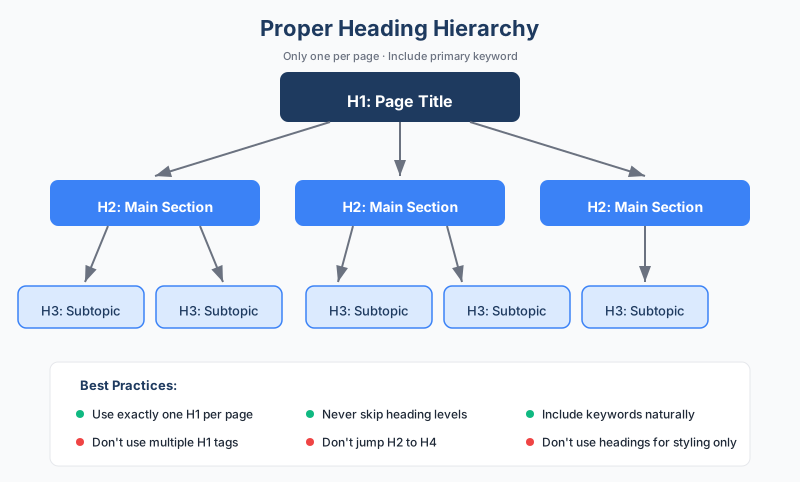
Essential: Heading Structure
Headings create a hierarchy that helps readers scan your content and helps search engines understand what each section covers. While heading structure alone isn't the most critical ranking factor, headings still play an important role in organizing content for both users and crawlers.
The key is that your heading hierarchy should make logical sense. If someone read only your headings, they should get a clear outline of the page.
- Use exactly one H1 per page, and include your primary keyword
- Use H2s for main sections and H3s for subsections
- Never skip heading levels (e.g., don't jump from H2 to H4)
- Include keywords in headings naturally, not forced
- Make headings descriptive enough to stand alone as a mini-outline
You can audit your existing heading structure using a heading checker tool.
Essential: Content Optimization
Your content needs to match the search intent behind the keyword. If someone searches "on-page SEO checklist," they want a practical, scannable list, not a 5,000-word essay on SEO theory. Understanding what searchers actually need is the foundation of effective content optimization.
- Include your primary keyword in the first 100 words
- Use semantically related terms throughout (don't just repeat one phrase)
- Cover the topic comprehensively for the intent type
- Match content depth and format to what's ranking in the SERPs
- Keep paragraphs short (2-4 sentences) for readability
- Use bullet points, numbered lists, and tables where they add clarity
- Break up walls of text with subheadings every 200-300 words
In practice, content optimization isn't about hitting a magic keyword density number. It's about creating the most useful page for the person searching that term.
Important: Internal Linking
Internal links are one of the most underused levers in SEO. Google has repeatedly emphasized the importance of internal linking, with Search Advocate John Mueller calling it one of the biggest things you can do on a website to guide both crawlers and visitors to important pages (Search Engine Journal).
Strategic internal linking helps distribute page authority across your site and creates clear topical relationships between content.
- Link to relevant related content from within your body text
- Use descriptive anchor text that tells readers (and Google) what the linked page covers
- Ensure important pages are reachable within 2-3 clicks from the homepage
- Add links to new content from existing high-authority pages
- Avoid generic anchor text like "click here" or "read more"
Important: Image Optimization
Images affect both user experience and page performance. Unoptimized images are one of the most common causes of slow page load times, which directly impacts engagement and rankings.
- Use descriptive, keyword-relevant file names (e.g.,
on-page-seo-checklist.png, notIMG_2093.png) - Add alt text to every meaningful image (for accessibility and SEO)
- Compress images to reduce file size without noticeable quality loss
- Use modern formats like WebP or AVIF where supported
- Implement lazy loading for images below the fold
- Ensure images are responsive for mobile devices
From experience, image compression alone can cut page load times dramatically, sometimes by several seconds, which makes it one of the highest-impact quick wins on this checklist.
Nice to Have: Schema Markup
Schema markup (structured data) helps search engines understand the specific meaning of your content, which can make you eligible for rich results like FAQ dropdowns, how-to steps, and star ratings in search.
Google's structured data documentation explains that markup helps search engines interpret what content represents and potentially qualify for enhanced SERP features (Google Search Central).
- Identify the appropriate schema type for your page (Article, FAQ, HowTo, Product, etc.)
- Implement using JSON-LD (Google's recommended format)
- Test your markup with Google's Rich Results Test before publishing
- Ensure the markup accurately reflects what's visible on the page
- Monitor for errors in Google Search Console's enhancements report
Schema won't guarantee rich results, but it significantly increases your eligibility for them.
Common On-Page Mistakes to Avoid
Even experienced SEOs make these errors. Here's what to watch for:
Keyword stuffing. Repeating your target keyword unnaturally throughout the page signals spam. Write for people first.
Duplicate title tags and meta descriptions. When multiple pages share the same title or description, Google struggles to differentiate them. Every important page needs unique metadata.
Ignoring mobile. Google uses mobile-first indexing, meaning your mobile experience is what gets evaluated for rankings. If your page looks great on desktop but breaks on a phone, that's a problem.
Neglecting page speed. Slow-loading pages lose visitors before they even read your content. A Deloitte and Google study of over 30 million user sessions found that even a 0.1-second speed improvement led to measurable increases in conversions and engagement (web.dev).
Over-optimizing at the expense of readability. Every on-page element should serve the reader. If an optimization makes the content worse for humans, it's not worth doing.
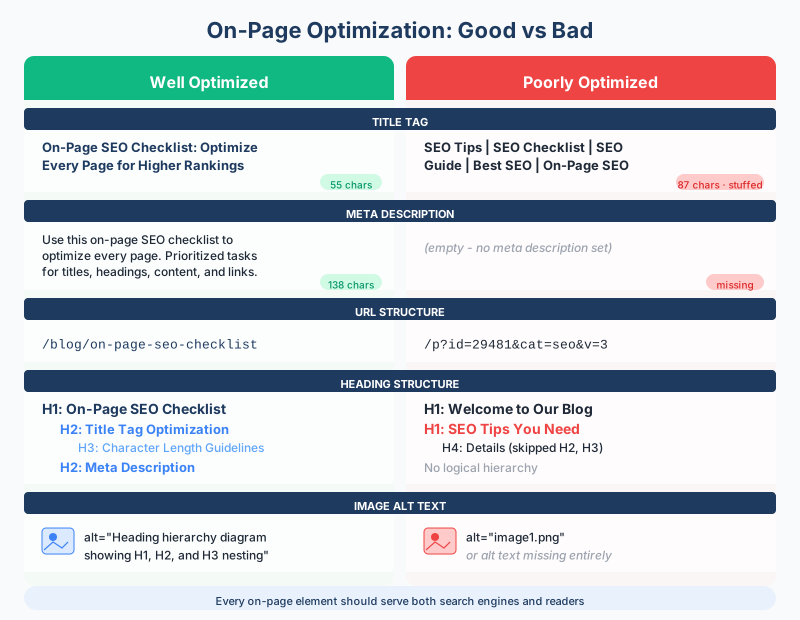
Your On-Page SEO Action Plan
If you're starting from scratch or auditing an existing page, work through this checklist in priority order:
- Fix all essential items first (title tags, meta descriptions, URLs, headings, content)
- Move to important items (internal links, images)
- Add nice to have polish (schema markup)
The key difference between pages that rank and pages that don't often comes down to consistent execution of these fundamentals. On-page SEO isn't complicated, but it does require attention to detail on every page you publish.
For a broader view of how on-page optimization fits into your overall approach, explore the relationship between E-E-A-T signals and SEO, which covers how trust, expertise, and authority factor into Google's quality evaluation.
Frequently Asked Questions
What is on-page SEO?
On-page SEO refers to optimizing the elements on your web pages that you directly control, including title tags, meta descriptions, headings, content, images, URLs, and internal links. The goal is to help search engines understand your content and help users find what they need quickly.
How often should I review on-page SEO?
For pages targeting competitive or time-sensitive keywords, review every 3-6 months. For evergreen content, an annual check is usually sufficient. Any time you notice a traffic decline on a specific page, an on-page audit should be your first step.
Does meta description affect rankings?
Meta descriptions are not a direct ranking factor. However, they significantly influence click-through rates, which can indirectly affect your SEO performance. A compelling meta description that earns more clicks sends positive engagement signals to Google.
How many internal links should a page have?
There's no exact number that works for every page. The guideline is to link wherever it genuinely helps the reader find related or deeper information. Most well-optimized blog posts include 3-10 internal links, depending on content length.
Is on-page SEO more important than off-page SEO?
Neither works well in isolation. On-page SEO ensures your content is relevant, well-structured, and optimized for search intent. Off-page SEO (primarily backlinks) builds your site's authority. You need both, but on-page optimization is typically the faster, more controllable starting point.