
You don't need a big budget or a marketing team to start ranking on Google. What you need is a clear, prioritized plan that focuses your limited time and money on the SEO actions that actually move the needle.
The challenge most small business owners face isn't a lack of information. It's the opposite: too much advice, most of it written for companies with dedicated SEO teams and five-figure monthly budgets. That's not you, and that's fine. SEO works for businesses of every size, but the approach needs to match your reality.
This guide walks you through exactly what to do, in what order, using mostly free tools and straightforward tactics. Whether you're a local service provider, an online shop, or a B2B company, you'll walk away with a prioritized action plan you can start executing this week.
Key Takeaways
- Start with Google Business Profile: For most small businesses, claiming and optimizing your Google Business Profile is the single highest-impact SEO action you can take.
- Focus on low-competition, high-intent keywords: You don't need to rank for broad terms. Target specific phrases your customers actually search for.
- Free tools are enough to start: Google Search Console, Google Analytics, and Google Business Profile give you a strong foundation at zero cost.
- Local SEO often matters most: According to BrightLocal's consumer research, 80% of US consumers search for local businesses weekly (BrightLocal, 2024). If you serve a specific area, local optimization should be your priority.
- SEO compounds over time: Unlike paid ads, the traffic you earn through SEO continues working for you months and years after the initial effort.
Why Small Businesses Face Unique SEO Challenges
Before diving into tactics, it helps to understand why generic SEO advice often falls flat for small businesses. The honest answer: most guides assume resources you don't have.
Limited budget is the obvious one. Enterprise SEO tools like Ahrefs and Semrush start at $99-139 per month. For a small business, that's a real expense, not a rounding error. The good news is you don't need them to get started.
Limited time is often the bigger constraint. You're running a business, not managing an SEO campaign. Any strategy that requires 20 hours per week of content production isn't realistic.
Limited expertise rounds out the trifecta. SEO has its own vocabulary, and the landscape shifts regularly. Google's recent algorithm updates have placed even more emphasis on helpful, experience-driven content, which is actually good news for small businesses with genuine expertise in what they do.
Here's what this means in practice: you need a strategy that prioritizes high-impact, low-effort actions first, and builds from there.
Your Prioritized SEO Action Plan
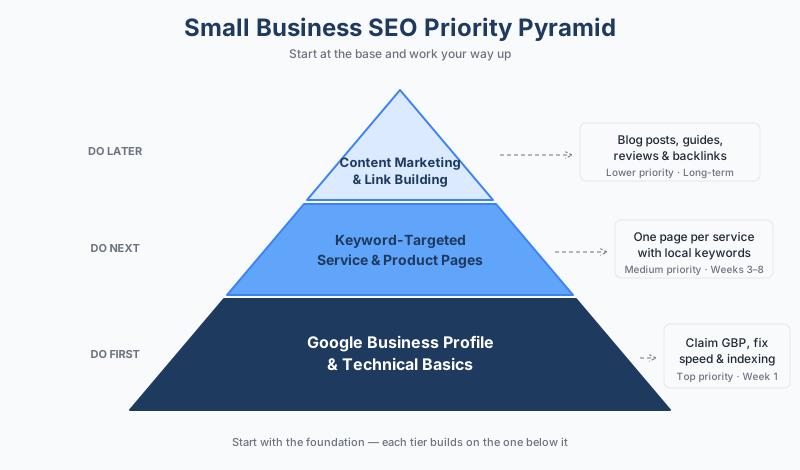
The following steps are ordered by impact. Start at the top and work your way down. Each step builds on the one before it.
Step 1: Claim and Optimize Your Google Business Profile
If you serve customers in a specific geographic area, this is non-negotiable. Your Google Business Profile (GBP) is what appears in the local map pack when someone searches for services near them, and it's often the first impression customers have of your business.
Here's what to do:
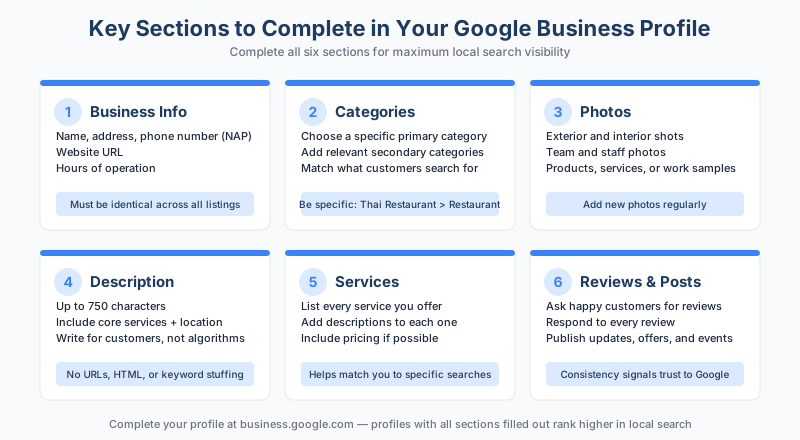
- Claim your profile at business.google.com if you haven't already
- Complete every section: business name, address, phone, hours, categories, services, and description
- Add high-quality photos of your business, team, and work
- Choose the most specific primary category that fits (e.g., "Family Dentist" rather than just "Dentist")
- Write a business description that naturally includes your core services and location
Why this matters: BrightLocal's 2026 Local Consumer Review Survey found that 97% of consumers read online reviews when evaluating businesses, and Google is the dominant platform for that research (BrightLocal, 2026). Your GBP is where those reviews live.
Step 2: Fix Basic Technical Issues
You don't need a technical SEO audit right now. But you do need to make sure Google can actually find and display your site properly. Run through these basics:
Mobile-friendliness: Google uses your mobile site for ranking. If your site is difficult to use on a phone, it's hurting you. Test this in Google Search Console under the "Page Experience" section.
Site speed: Pages that take more than three seconds to load lose visitors. Compress your images, use a reliable hosting provider, and remove unnecessary plugins if you're on WordPress.
Indexing: Make sure Google can find your important pages. Set up Google Search Console (free), submit your sitemap, and check for any indexing errors.
Step 3: Target Low-Competition, High-Intent Keywords
This is where many small businesses go wrong. They try to rank for broad terms like "plumber" or "accounting services" and get nowhere because they're competing against national directories and established brands.
Instead, focus on long-tail keywords that signal buying intent. These are longer, more specific phrases that your ideal customer actually types into Google.
For example:
| Instead of... | Target... |
|---|---|
| plumber | emergency plumber in [your city] |
| accounting services | small business tax accountant [your city] |
| web design | affordable website design for restaurants |
Here's how to find these keywords for free:
- Google Search Console: Shows you what queries already bring people to your site. Look for opportunities where you're ranking on page two (positions 11-20) and could improve.
- Google's autocomplete: Start typing your service in Google and note the suggestions. These are real searches people make.
- "People Also Ask" boxes: These show related questions people search for, perfect for content ideas.
- Google Keyword Planner: Free with a Google Ads account (you don't need to run ads). Gives you search volume estimates.
Once you have a list of 10-20 target keywords, prioritize the ones that combine reasonable search volume with clear buying intent.
Step 4: Create Core Service and Product Pages
Every service or product you offer should have its own dedicated page on your website. This is the foundation of your on-site SEO.
Each page should include:
- A clear, descriptive title tag with your target keyword (keep it under 60 characters)
- A meta description that tells searchers exactly what to expect (under 155 characters)
- A heading (H1) that includes the service and, if relevant, your location
- Detailed content explaining what you offer, who it's for, and what makes your approach different
- Clear calls to action (phone number, contact form, booking link)
In practice, a plumber in Austin might have separate pages for "Drain Cleaning in Austin," "Water Heater Repair Austin," and "Emergency Plumbing Services Austin" rather than one generic "Services" page.
The key difference between a page that ranks and one that doesn't is often depth and specificity. For small businesses, that means writing from your actual experience serving customers.
Step 5: Build Local Citations and Consistency
A citation is any mention of your business name, address, and phone number (NAP) online. Consistent citations across directories help Google verify your business is legitimate.
Start with the essentials:
- Google Business Profile (already done in Step 1)
- Bing Places for Business
- Apple Business Connect
- Yelp
- Your industry's relevant directories (Healthgrades for healthcare, Avvo for lawyers, Houzz for home services)
The critical rule: your business name, address, and phone number must be identical everywhere. Even small differences, like "St." vs. "Street" or a missing suite number, can create confusion for search engines.
Don't try to submit to 50 directories at once. Start with the five to ten most relevant ones, make sure the information is accurate, and add more over time. If you've changed your address or phone number in the past, audit your existing listings first. Outdated information in old directories can actively hurt your local rankings.
Step 6: Generate and Manage Reviews
Reviews influence both rankings and conversions. BrightLocal's research shows that 68% of consumers will only use a business with a rating of 4 or more stars. Beyond that, review velocity (how consistently you earn new reviews) is itself a local ranking signal.
Build a simple review generation process:
- Ask customers for reviews after a positive interaction
- Make it easy by sending a direct link to your Google review page
- Respond to every review, both positive and negative, with personalized replies
- Never buy fake reviews. Google actively detects and penalizes this, and it can get your profile suspended
Free and Low-Cost Tools That Actually Help
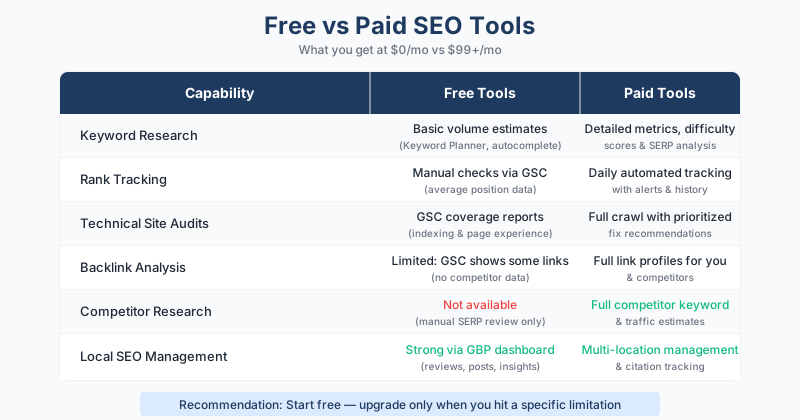
You don't need expensive software to do effective SEO. Here's a practical tool stack for small businesses:
| Tool | Cost | What It Does |
|---|---|---|
| Google Search Console | Free | Shows how Google sees your site, indexing issues, search performance |
| Google Analytics (GA4) | Free | Tracks website traffic, user behavior, conversions |
| Google Business Profile | Free | Manages your local listing, reviews, and local visibility |
| Google Keyword Planner | Free | Keyword ideas and search volume estimates |
| Bing Webmaster Tools | Free | Insights for Bing search visibility |
Once you've established your foundation with free tools and are seeing results, you might consider adding a paid tool for deeper analysis.
Creating Content Without a Big Budget
You don't need to publish three blog posts a week. For small businesses, a focused content strategy beats volume every time.
Start with your most common customer questions. What do people ask you before they buy? What objections come up? What do they wish they'd known earlier? Each of those questions is a potential page or blog post that targets real search queries.
From experience, the most effective content approach for small businesses follows this pattern: write one thorough piece per month targeting a specific keyword your customers search for. A single well-researched, 1,500-word article that genuinely answers a question will outperform ten thin posts that barely scratch the surface.
If writing isn't your strength, consider repurposing what you already create. Customer case studies, project walkthroughs, before-and-after examples, and answers to frequently asked questions all make excellent SEO content because they demonstrate the real experience that Google's E-E-A-T framework rewards. You can also preview how your pages will appear in search results using a free SERP simulator before publishing.
When to DIY vs. When to Hire Help
Most of the steps above are things you can do yourself. Here's a realistic breakdown:
Do it yourself:
- Google Business Profile setup and management
- Review generation and response
- Basic content creation for service pages
- Google Search Console monitoring
- Directory citation submissions
Consider hiring help for:
- Website redesigns or major technical issues
- Content strategy and ongoing content production at scale
- Link building campaigns
- Competitive markets where you need an edge
How to evaluate SEO help (and avoid scams): Be cautious of anyone who guarantees specific rankings or promises results within weeks. SEO takes time, and realistic timelines range from three to six months for initial traction, with more meaningful results at six to twelve months. Also watch out for agencies that won't explain what they're doing, use vague jargon, or lock you into long contracts without clear deliverables.
Setting Realistic Expectations
The honest answer about SEO timelines: it depends on your competition, your starting point, and how consistently you execute. But here are some general benchmarks:
Month 1-2: Technical fixes and GBP optimization can produce quick improvements in local visibility. Some businesses see local pack appearances within weeks of optimizing their profile.
Month 3-6: Content and keyword targeting start gaining traction. You'll begin to see ranking improvements for your target keywords, especially longer-tail terms.
Month 6-12: Compounding effects kick in. As you build authority and earn backlinks naturally, rankings and traffic accelerate. According to research from Ahrefs, roughly 96.55% of web pages get no organic traffic from Google. The pages that do succeed tend to have quality backlinks and genuinely useful content, both of which take time to build.
The businesses that see the best results are the ones that integrate SEO into their ongoing routine rather than treating it as a one-time project. Even 30 minutes a week spent on updating your Google Business Profile, responding to reviews, or publishing a short piece of helpful content adds up. If you want a broader framework for planning your approach, our guide to building an SEO strategy covers goal setting, prioritization, and resource allocation in detail.
What most guides miss is that small businesses often have an advantage in their specific niche or location. A national brand can't demonstrate the local expertise, community involvement, and customer relationships that you can. In Google's own words, the SEO Starter Guide encourages you to focus on what's best for your business area. That's your edge.
The comparison between SEO and paid advertising often comes down to this: PPC delivers immediate traffic that stops when you stop paying. SEO builds an asset that appreciates over time. For small businesses with limited budgets, that compounding return is exactly what makes SEO worthwhile.
Frequently Asked Questions
How much should a small business spend on SEO?
There's no universal answer, but many small businesses start with zero dollars using free tools and their own time. If you're hiring help, small business SEO services typically range from $500 to $2,000 per month depending on your market and goals. Start with the free foundations first and invest in paid tools or services once you understand what you need.
Is SEO worth it for a very small local business?
Yes, and local SEO specifically is often the highest-ROI marketing channel for small businesses. When someone searches "plumber near me" or "best coffee shop in [your town]," appearing in those results drives real customers through your door. The key is focusing on local optimization rather than trying to compete nationally.
How long does it take for small business SEO to work?
Most small businesses start seeing local visibility improvements within one to three months, especially from Google Business Profile optimization. Broader keyword rankings typically take three to six months of consistent effort. Significant traffic growth usually happens in the six to twelve month range, though this varies by competition level.
Can I do SEO myself, or do I need to hire someone?
You can absolutely start yourself. The steps in this guide are designed for business owners without SEO experience. The most common point where hiring makes sense is when you've handled the basics and want to scale through content production or technical improvements that require specialized knowledge.
What's the single most important thing a small business should do for SEO?
If you serve local customers, claim and fully optimize your Google Business Profile. It's free, it takes a few hours, and it's the fastest path to appearing in local search results. If you're an online-only business, focus on creating thorough, helpful pages for each product or service you offer.