Every time you type a query into Google, you get results in less than a second. Behind that speed is a three-stage process that involves discovering billions of pages, organizing them into a massive database, and deciding which ones best answer your question.
Understanding how search engines work is one of the most important foundations of search engine optimization. If you don't know how Google finds, stores, and ranks content, you're optimizing in the dark. The good news: the core process hasn't fundamentally changed in over two decades, even as the technology behind it has become dramatically more sophisticated.
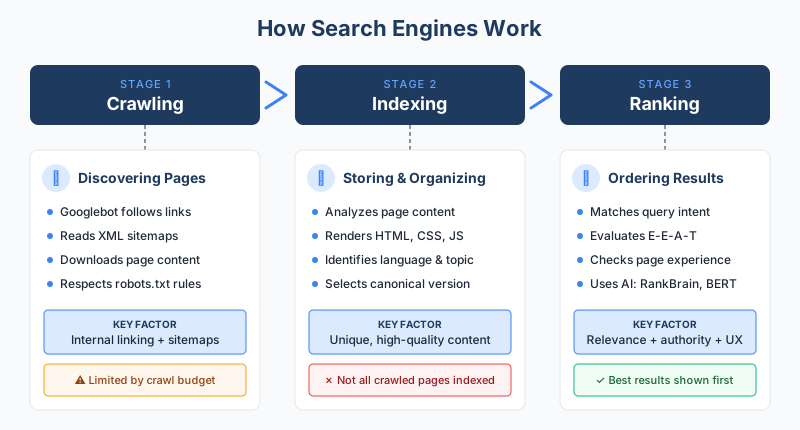
According to Google Search Central, search works in three stages, and not all pages make it through each one: crawling, indexing, and serving search results. Let's break down each stage and what it means for your website.
Key Takeaways
- Search engines follow a three-stage process: Crawling discovers pages, indexing stores and organizes them, and ranking determines which results appear for each query.
- Not every page gets indexed: Google is selective about what it adds to its index, prioritizing pages with unique, high-quality content.
- Googlebot uses links and sitemaps to discover content: Internal linking and a clean site architecture directly affect how well your site gets crawled.
- Ranking relies on hundreds of factors: Relevance, content quality, backlinks, user experience, and context signals like location and device all play a role.
- Mobile-first indexing is now the default: Since July 2024, Google uses the mobile version of every website for crawling and indexing.
Crawling: How Search Engines Discover Content
Crawling is the discovery phase. Search engines use automated programs called crawlers (also known as spiders or bots) to navigate the web and find new or updated pages.
What Crawlers Are and How They Work
Google's primary crawler is called Googlebot. It works by downloading web pages and then following the links on those pages to discover new URLs. Think of it as a librarian who reads every book in the library and then follows every reference in every footnote to find more books.
According to Google's documentation, the vast majority of pages in Google's results aren't manually submitted. They're found and added automatically as crawlers explore the web. Google also notes that it doesn't accept payment to crawl a site more frequently or to rank it higher.
Crawlers discover pages through two main paths:
- Following links: When Googlebot lands on a page, it follows every link it finds to discover new URLs. This is why internal linking matters so much for SEO.
- Sitemaps: An XML sitemap is a file that lists all the important URLs on your site, making it easier for crawlers to find your content. You can submit your sitemap through Google Search Console and verify it with a sitemap checker.
Crawl Budget and Why It Matters
Google doesn't have unlimited resources to crawl every page on the internet. The concept of crawl budget refers to how many pages Googlebot will crawl on your site within a given timeframe.
For most small and medium websites, crawl budget isn't a concern. But for large sites with thousands or millions of pages, it becomes critical. Pages blocked by your robots.txt file, slow server response times, and excessive duplicate content can all waste crawl budget. You can test your robots.txt configuration with a free robots.txt tester to make sure you're not accidentally blocking important pages.
Major Search Engine Crawlers
While Google dominates with roughly 90% of the global search market, other search engines have their own crawlers:
| Search Engine | Crawler Name | Notable Feature |
|---|---|---|
| Googlebot | Largest index, mobile-first crawling | |
| Bing | Bingbot | Powers Yahoo, DuckDuckGo results |
| Yandex | YandexBot | Dominant in Russia |
| Baidu | Baiduspider | Dominant in China |
Since July 2024, Google has fully completed its transition to mobile-first indexing. This means Googlebot now exclusively uses a smartphone crawler to index all websites. If your site doesn't work on mobile devices, it may not get indexed at all. Google first announced the completion of mobile-first indexing in October 2023, with the final remaining sites migrated to smartphone crawling as of July 5, 2024.
Indexing: How Search Engines Store and Organize Content
Once a page is crawled, the next step is indexing. This is where Google analyzes the page's content and decides whether to add it to its database.
What It Means to Be Indexed
Google's index is essentially a massive digital library. According to Google's How Search Works site, the search index contains hundreds of billions of web pages and is well over 100 million gigabytes in size. During testimony in the United States v. Google antitrust trial, Google's VP of Search Pandu Nayak revealed that the index contained roughly 400 billion documents as of 2020, according to Search Engine Land's coverage of the trial, a number that has likely grown since.
When Google indexes a page, it processes the text, images, and video content on that page. It identifies what the page is about, what language it's written in, whether the content is local to a specific country, and how usable the page is. All of this information gets stored as signals that can be used later during ranking.
Indexing also involves rendering, where Google processes the page's HTML, CSS, and JavaScript to see the page as a user would. This is especially important for sites that rely on JavaScript frameworks, since Google needs to execute scripts to see the final version of the content. Pages with heavy client-side rendering may experience delays in indexing because of this extra step.
Why Pages Might Not Get Indexed
Being crawled doesn't guarantee indexing. Google is selective. According to Google Search Central, during indexing, Google also determines whether a page is a duplicate of another page on the internet. If it is, Google picks the most representative version (the canonical) and may skip the rest.
Common reasons a page might not get indexed include:
- Low-quality or thin content that doesn't provide unique value
- Duplicate content that exists elsewhere on your site or the web
- Technical blocks like a noindex meta tag, robots.txt restrictions, or pages returning error codes (like 404s)
- Canonical tag issues pointing Google to a different version of the page (you can check yours with a free canonical tag checker)
How to Check Your Indexing Status
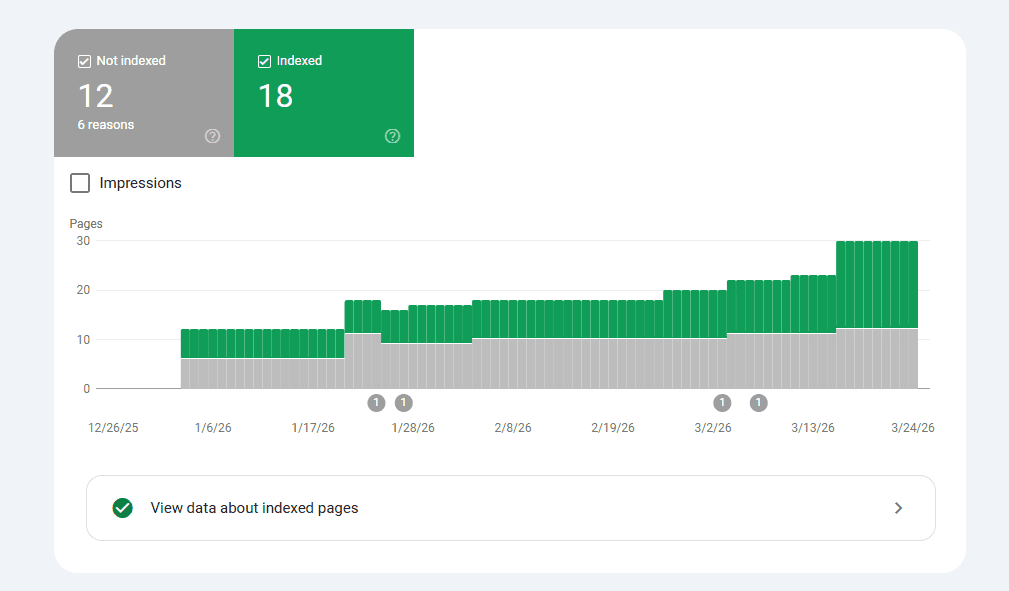
Google Search Console is the best tool for monitoring which of your pages are indexed. The Pages report (formerly Index Coverage) shows exactly how many of your URLs are indexed, which ones are excluded, and why. You can also use the URL Inspection tool to check the status of any individual page and request indexing for new or updated content.
Indexed vs. Cached: What's the Difference?
These terms are often confused, but they refer to different things. Being indexed means Google has analyzed your page and stored it in its database, making it eligible to appear in search results. Being cached means Google has saved a snapshot of your page's content at a specific point in time. You can sometimes view this cached version through search results, but Google has been gradually de-emphasizing the cache feature. The important distinction: a page can be indexed (and therefore rank in search results) even if Google doesn't display a cached copy of it.
Ranking: How Search Engines Order Results
When someone enters a search query, Google doesn't search the live web. It searches its index. The ranking stage is where Google's algorithms determine which indexed pages are most relevant and useful for that specific query, and in what order to display them.
What Happens When You Search
According to Google's explanation of ranking, the algorithms look at many factors and signals, including the words of your query, relevance and usability of pages, expertise of sources, and your location and settings. The weight of each factor changes depending on the nature of the query. For instance, content freshness matters more for a news search than for a dictionary definition.
Key Categories of Ranking Factors
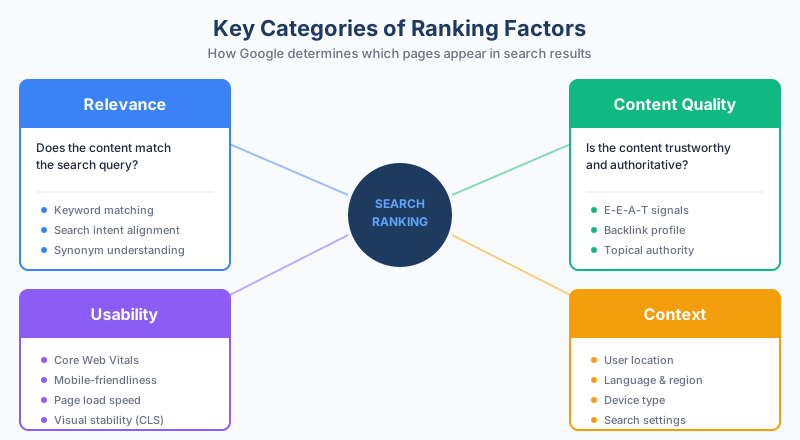
Google uses hundreds of individual signals, but they fall into a few broad categories:
Relevance. Does the content match what the user is searching for? Google uses language models to understand search intent, recognizing synonyms, correcting spelling, and identifying context. A search for "change laptop brightness" will match pages about "adjust laptop brightness" because Google understands they mean the same thing.
Content quality. Google evaluates whether content demonstrates experience, expertise, authoritativeness, and trustworthiness, commonly known as E-E-A-T. One of the key quality signals is whether other prominent websites link to or reference the content, which is why backlinks remain one of the most important ranking factors.
Usability. Page experience factors like loading speed, mobile-friendliness, and visual stability (measured through Core Web Vitals) influence how pages rank. A slow, difficult-to-use page may lose ground to a faster, better-designed competitor covering the same topic.
Context and personalization. Location, language, device type, and search settings all affect what results appear. A search for "pizza delivery" in New York shows completely different results than the same query in London.
The Role of Algorithms and AI
Google's ranking systems include several AI-powered components that help interpret queries and match them to relevant content:
- RankBrain uses machine learning to help process queries Google hasn't seen before. When Google first introduced RankBrain in 2015, it noted that roughly 15% of daily searches were entirely new queries.
- BERT (Bidirectional Encoder Representations from Transformers) helps Google understand the nuance of natural language, especially prepositions and context words that change meaning.
- MUM (Multitask Unified Model) can understand and generate language across dozens of languages. According to Google's ranking systems guide, MUM is currently used for specific applications like improving featured snippet callouts rather than general ranking.
These systems work alongside hundreds of other signals. Google's ranking systems are designed to work at the page level, using both page-specific signals and site-wide signals to understand how to rank individual pages.
According to Google, the company ran over 700,000 experiments and made more than 4,000 improvements to Search in 2023 alone, which is why staying current with Google algorithm updates matters for anyone doing SEO.
The Practical Implications for SEO
Understanding how search engines work isn't just academic. It directly informs how you should approach on-page optimization and technical SEO.
For crawling: Make sure your site has a clean internal linking structure so crawlers can discover all your important pages. Submit an XML sitemap. Don't block pages you want indexed with robots.txt or noindex tags.
For indexing: Create unique, valuable content on every page. Avoid thin pages that add no value. Use canonical tags correctly to prevent duplicate content confusion. Monitor your index coverage in Google Search Console.
For ranking: Focus on creating the best possible content for your target audience. Build topical authority by covering subjects comprehensively. Earn quality backlinks from relevant sites. Make sure your site loads fast and works well on mobile. And remember that ranking is comparative, not absolute: your page doesn't need to be perfect, it just needs to be more relevant, more useful, and more trustworthy than the other pages competing for the same query.
The fundamentals haven't changed: search engines want to connect users with the most helpful, relevant content. The technology behind crawling, indexing, and ranking has evolved enormously since Google launched in 1998, but the core objective remains the same. The sites that consistently deliver genuine value to their audience are the ones that earn and maintain strong search visibility over time.
Frequently Asked Questions
How long does it take for Google to index a new page?
There's no guaranteed timeline. Some pages get indexed within hours, while others may take days or weeks. You can speed up the process by submitting your URL through Google Search Console's URL Inspection tool, having a strong internal linking structure, and ensuring your sitemap is up to date. Pages on authoritative, frequently-crawled sites tend to get indexed faster.
Does Google index every page on the internet?
No. Google discovers trillions of URLs through crawling, but it only indexes the pages it considers useful and unique. Pages with thin content, duplicate content, or technical barriers like noindex tags or robots.txt blocks may be crawled but never added to the index. Google has stated that it doesn't want to index the entire web, just the useful parts.
What's the difference between crawling and indexing?
Crawling is the process of discovering and downloading pages. Indexing is the process of analyzing and storing those pages in Google's database. A page can be crawled without being indexed if Google determines it doesn't meet quality thresholds. However, a page cannot be indexed without being crawled first.
How do search engines handle JavaScript content?
Google can render JavaScript, but it requires an extra processing step. After the initial crawl, Google places JavaScript-heavy pages in a rendering queue, processes the JavaScript, and then indexes the rendered content. This can delay indexing. For critical content, it's best to ensure it's available in the initial HTML rather than relying entirely on client-side JavaScript rendering.
Are search engines other than Google worth optimizing for?
Google handles roughly 90% of global search traffic, so it's the primary focus for most SEO strategies. However, Bing powers several other search experiences including DuckDuckGo and parts of Yahoo, so optimizing for Bing can expand your reach. The good news is that most SEO best practices work across all major search engines since they all follow the same fundamental process of crawling, indexing, and ranking.
Sources
- Google Search Central - How Google Search Works. https://developers.google.com/search/docs/fundamentals/how-search-works
- Google Search Central - A Guide to Google Search Ranking Systems. https://developers.google.com/search/docs/appearance/ranking-systems-guide
- Google - How Google Search ranking results work. https://www.google.com/intl/en_us/search/howsearchworks/how-search-works/ranking-results/
- Google Search Central Blog - Mobile-first indexing is now complete. https://developers.google.com/search/blog/2023/10/mobile-first-is-here
- Search Engine Land - How Google Search and ranking works, according to Google's Pandu Nayak. https://searchengineland.com/how-google-search-ranking-works-pandu-nayak-435395
- Google - How Search organizes information. https://www.google.com/search/howsearchworks/
- Google Search Central - Google crawlers overview. https://developers.google.com/search/docs/crawling-indexing/overview-google-crawlers