
When someone asks ChatGPT or Perplexity about your business, the AI doesn't crawl your entire website the way Google does. It grabs whatever it can find quickly, parses through messy HTML, and hopes for the best. If your most important pages aren't easy to locate and read, they get ignored entirely.
That's the problem the llms.txt file is designed to solve. Proposed in September 2024 by Jeremy Howard of Answer.AI, llms.txt is a Markdown-formatted file that lives in your website's root directory. It provides AI systems with a curated, clean summary of your site's most important content, structured specifically for how large language models process information.
If you're working on AI search optimization, understanding llms.txt is worth your time. It won't replace your existing SEO fundamentals, and it comes with important caveats about adoption. But the concept represents a shift in how we think about making websites accessible to AI, and getting familiar with it now puts you ahead of the curve.
Here's what this looks like in practice, what the file actually contains, and how to create one for your own site.
Key Takeaways
- LLMs.txt is a proposed standard, not an established one. No major AI provider has officially confirmed using it for crawling, so treat implementation as forward-looking, not urgent.
- The file lives at your root directory (/llms.txt) and uses Markdown formatting to guide AI systems to your most valuable content.
- It complements robots.txt and sitemaps rather than replacing them. Robots.txt controls access, sitemaps list pages, and llms.txt curates content for AI comprehension.
- Adoption is growing but still limited. As of early 2026, implementation remains a small fraction of the web, with the strongest adoption among developer documentation and AI-native companies.
- Implementation is low-effort and low-risk. Even if AI platforms don't fully adopt the standard, you end up with a clean summary of your most important content.
What Is an LLMs.txt File?
An llms.txt file is a plain-text document written in Markdown that sits at the root of your website (e.g., yoursite.com/llms.txt). Its purpose is to give large language models a concise, structured map of your site's most important resources so they can understand your content without parsing through navigation menus, JavaScript, ad scripts, and other HTML clutter.
Understanding why this matters requires understanding how LLMs interact with web content differently from search engines. When Google crawls your site, it indexes everything methodically and stores it for later retrieval. When an AI assistant answers a question about your business, it typically fetches content on the spot during inference, working within a limited context window that can't accommodate an entire website. That constraint makes curation essential. Your llms.txt file is the curated version.
The key difference from other files you may already have:
| File | Purpose | Audience |
|---|---|---|
| robots.txt | Controls which bots can access which pages | Search engine crawlers |
| sitemap.xml | Lists all indexable URLs with metadata | Search engines |
| llms.txt | Curates high-value pages for AI comprehension | Large language models |
Here's what this means in practice. Your robots.txt file tells bots where they can and can't go. Your sitemap gives search engines a complete URL inventory. Your llms.txt file does something different entirely: it tells AI systems, "If you only have time to read a few things about us, start here."
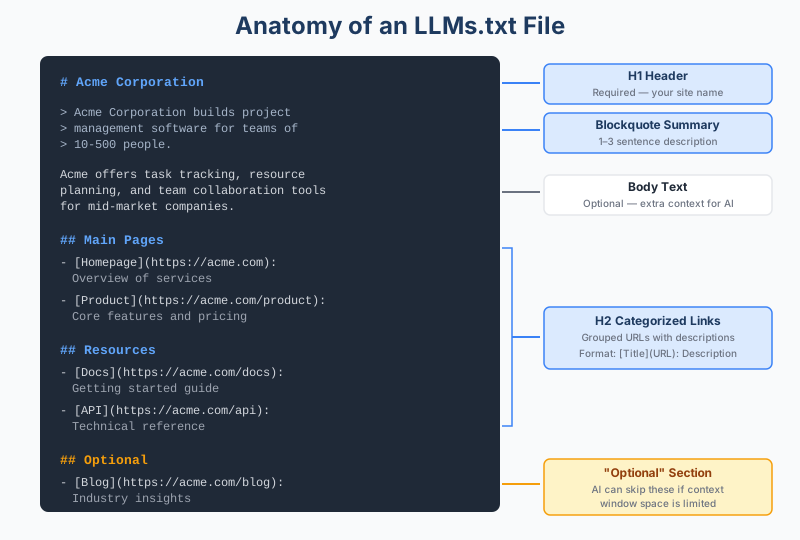
The spec is intentionally minimal. According to the official proposal at llmstxt.org, a compliant file contains sections in this specific order:
- An H1 header with your site or project name (the only required element)
- A blockquote with a short summary of what your site does
- Optional body text with additional context or instructions
- H2 sections containing categorized lists of URLs with descriptions
- An "Optional" section for secondary resources that can be skipped if the AI's context window is limited
The file uses Markdown rather than XML or JSON because language models natively understand Markdown better than structured data formats. It's both human-readable and machine-readable by design.
Who's Using It (and Who Isn't)
The honest answer is that llms.txt adoption is still early. Understanding the current landscape helps you make an informed decision about whether to implement it now.
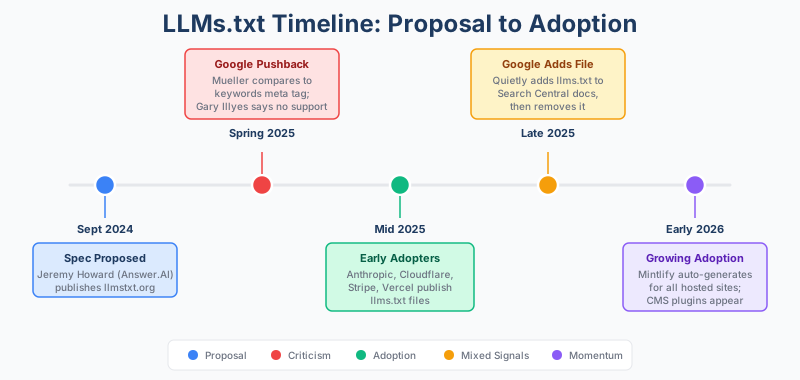
Where adoption is strongest: Developer documentation sites, AI-native companies, and SaaS platforms lead the way. Companies like Anthropic, Cloudflare, Vercel, Stripe, and Coinbase have all published llms.txt files. The documentation platform Mintlify rolled out automatic llms.txt generation across all sites it hosts, bringing thousands of documentation sites on board practically overnight.
Broad analyses of llms.txt adoption suggest that implementation remains in the single-digit-to-low-double-digit percentage range across the web. That's a meaningful start for a standard less than two years old, but far from universal adoption. Notably, no publicly available research has found a correlation between having an llms.txt file and being cited more frequently by AI systems.
The skeptic's case: Google's John Mueller compared llms.txt to the deprecated keywords meta tag in spring 2025, noting that no major AI system was actively requesting these files. At Search Central Live in July 2025, Gary Illyes stated that Google doesn't support llms.txt and wasn't planning to. Server log analyses from multiple publishers confirmed that major AI crawlers like GPTBot, ClaudeBot, and PerplexityBot were not specifically requesting the file.
The nuance: Despite those public dismissals, Google quietly added an llms.txt file to its own Search Central documentation in late 2025, as reported by Search Engine Roundtable. The file was later removed, but the move raised eyebrows across the SEO community. Additionally, Google's Agent Development Kit documentation, which covers its Agent-to-Agent (A2A) protocol, included llms.txt files, suggesting at least experimental interest in the format internally.
From experience, this pattern isn't unusual for emerging web standards. Robots.txt, schema markup, and sitemaps all faced years of inconsistent adoption before becoming standard practice. The question isn't whether llms.txt matters today, but whether the underlying concept of curating content for AI consumption will matter long-term. That trajectory looks increasingly likely.
How to Create an LLMs.txt File
Creating your llms.txt file is straightforward. You can use our free llms.txt generator to build one in minutes, or follow these steps to create one manually.
Step 1: Identify Your Priority Pages
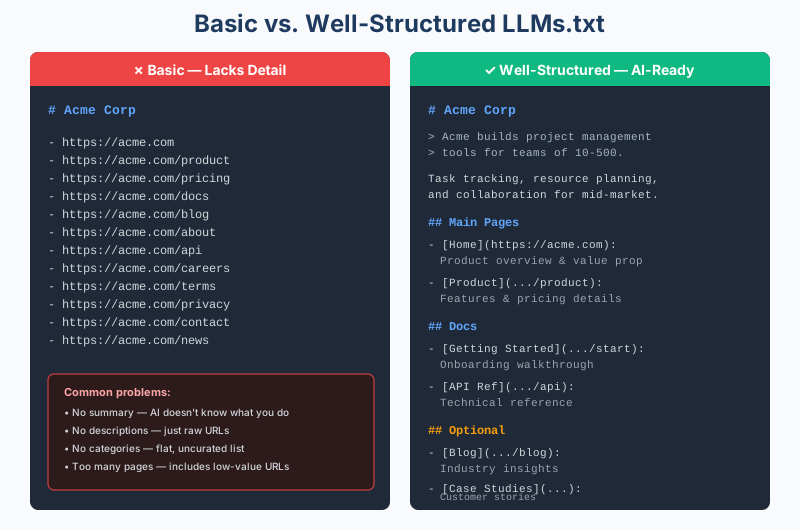
Don't try to list every page on your site. An llms.txt file is a curated selection, not a duplicate sitemap. Focus on the 5 to 15 pages that best represent your business.
Consider including:
- Your homepage or about page
- Core product or service pages
- Key documentation or guides
- Pricing page (if public)
- Most important blog content or case studies
- FAQ or help center landing pages
The goal is to include pages that, if an AI read only those, it would have an accurate understanding of what your business does and how you help customers.
Step 2: Write the File in Markdown
Open any text editor and create a file named llms.txt. Follow this structure:
# Your Company Name

> A 1-3 sentence description of what your company does,
> who you serve, and what makes you different.

Additional context or instructions for AI systems go here.
For example, key product categories, target audience,
or content guidelines.

## Main Pages

- [Homepage](https://yoursite.com): Overview of services and value proposition
- [Product Overview](https://yoursite.com/product): Core features and use cases
- [Pricing](https://yoursite.com/pricing): Current plans and pricing structure

## Resources

- [Getting Started Guide](https://yoursite.com/docs/start): Step-by-step onboarding
- [API Documentation](https://yoursite.com/docs/api): Technical reference

## Optional

- [Company Blog](https://yoursite.com/blog): Industry insights and updates
- [Case Studies](https://yoursite.com/case-studies): Customer success stories
A few formatting rules to keep in mind. Each URL listing uses the pattern [Link Title](URL): Description. The H2 sections group related pages. The "Optional" section has special meaning in the spec: its contents can be skipped when the AI has limited context window space.
Step 3: Add Practical Examples by Site Type
What to include varies by business model. Here's what this looks like for different site types:
E-commerce site: Product category pages, shipping and returns policy, size guides, bestsellers page, and your brand story.
SaaS company: Product features page, documentation hub, integration guides, pricing, and API reference.
Content site or blog: Your pillar content pages, about page, editorial guidelines, and topic category pages.
Local business: Service pages, location information, booking or contact page, and customer reviews page.
Step 4: Upload to Your Root Directory
Place the file at the root of your domain so it's accessible at yoursite.com/llms.txt. This mirrors the convention used by robots.txt and sitemap.xml. If you place it in a subdirectory, AI crawlers may never find it.
For WordPress users, Yoast SEO now includes a feature that auto-generates an llms.txt file directly from your plugin settings. Other CMS platforms are adding similar support. If you manage your own server, simply upload the file to your public_html or equivalent root folder.
Step 5: Validate and Test
After publishing, visit yoursite.com/llms.txt in your browser to confirm it loads as clean text. Check that all URLs resolve correctly and descriptions are accurate.
You can also test how AI systems interpret your content by copying your llms.txt contents into ChatGPT, Claude, or another AI assistant and asking it questions about your business. If the AI can answer accurately using only your llms.txt content, you've built an effective file.
Advanced: Companion Files and Markdown Versions
The llms.txt spec also proposes creating Markdown versions of your most important pages. The convention is to add .md to the URL of any existing page: so yoursite.com/docs/start would also have a clean Markdown version at yoursite.com/docs/start.md.
This takes more development effort but solves a real problem. When AI systems fetch your regular HTML pages, they have to strip away menus, scripts, popups, and formatting code to get to the actual content. A clean Markdown version eliminates that overhead entirely.
Two companion file types are also worth knowing:
- llms-full.txt: A single file containing the full Markdown content of all pages listed in your llms.txt. This lets AI systems ingest everything at once rather than fetching pages individually.
- llms-ctx.txt: A context-expanded version that includes the contents of linked URLs in an XML-style structure optimized for AI consumption.
For most businesses, starting with a well-structured llms.txt file is sufficient. The companion files become valuable at scale, particularly for documentation-heavy sites, developer platforms, or large content libraries.
What to Expect (and What Not to Expect)
Let's be direct about outcomes. As of early 2026, implementing llms.txt will not:
- Improve your traditional Google rankings
- Guarantee your content appears in AI-generated answers
- Replace the need for strong content, E-E-A-T signals, or solid technical SEO
Google's own guidance on succeeding in AI search experiences emphasizes the same fundamentals: unique, helpful content, good page experience, and solid technical foundations. There is no shortcut file that bypasses those requirements.
What it may do:
- Give AI systems a cleaner, more accurate picture of your business when they do visit your site
- Position your site for potential future adoption by AI platforms
- Force a useful internal exercise of identifying your most important pages
- Provide value for AI agent workflows, particularly in developer and documentation contexts
The practical risk is essentially zero. You're investing an hour or two of work for a file that, at worst, sits quietly on your server. At best, it becomes part of a standard that shapes how AI systems discover content over the next several years.
If you're already thinking about how your content appears in Google AI Overviews or evaluating the differences between AEO and traditional SEO, adding an llms.txt file fits naturally into that broader strategy. It's one more signal that tells AI systems your content is structured, accessible, and worth referencing.
To monitor whether AI systems are actually engaging with your content, you need to track AI search visibility over time. Tools like SEOForge's AI Visibility Monitor can help you track how often your brand appears in responses from ChatGPT, Perplexity, Claude, and other AI platforms, giving you concrete data on whether your optimization efforts are paying off.
Common Mistakes to Avoid
A few things to watch for when implementing llms.txt:
Don't include every page. This is a curation exercise, not a sitemap. Listing hundreds of URLs defeats the purpose and wastes the AI's limited context window.
Don't use robots.txt syntax. Some early adopters mistakenly used User-agent and Disallow directives. The llms.txt spec uses Markdown, not crawler directives.
Don't expect overnight results. This is a forward-looking investment in how your site communicates with AI. Treat it as one piece of a broader AI search optimization strategy, not a quick win.
Don't contradict your other files. If you've blocked certain pages in robots.txt, don't include them in your llms.txt. Keep your access policies consistent across all configuration files.
Don't forget to maintain it. When you publish major new content, restructure your site, or change your product offerings, update your llms.txt accordingly. Stale files pointing to deleted pages look sloppy to both humans and machines.
Consider noindexing the file. Google's John Mueller has recommended adding a noindex directive to prevent your llms.txt from appearing in regular search results. If other sites link to your file, it could get indexed and confuse users who land on a raw Markdown page instead of your actual website. A simple noindex HTTP header or meta robots directive can prevent this.
Frequently Asked Questions
Does llms.txt improve my Google rankings?
No. Google has not indicated that llms.txt influences traditional search rankings in any way. The file is designed specifically for large language models used in AI search tools like ChatGPT, Perplexity, and Claude. Your ranking improvements will still come from strong content, technical SEO, and authority signals.
Is llms.txt the same as robots.txt for AI?
Not quite. Robots.txt controls bot access by allowing or blocking crawling of specific pages. LLMs.txt serves a completely different purpose: it curates and highlights your most important content for AI comprehension. The two files complement each other but don't overlap in function.
Do any AI systems actually use llms.txt right now?
As of early 2026, no major AI provider has officially confirmed using llms.txt for their crawlers. However, the standard has gained significant adoption among developer documentation platforms and AI-native companies. The situation is evolving, so check current documentation from AI providers for the latest status.
How often should I update my llms.txt file?
Review it quarterly, or whenever you make significant changes to your site structure, product offerings, or key content. WordPress users with Yoast SEO can automate this process. If you manage it manually, set a calendar reminder to review it alongside your content audits.
Should I also create Markdown (.md) versions of my pages?
For most sites, starting with just the llms.txt file is practical and sufficient. Creating .md versions of pages adds development complexity but provides cleaner content for AI systems. If you run a documentation-heavy site or developer platform, the extra effort may be worthwhile. For a standard business website or blog, the base llms.txt file is a solid starting point.