
You do not need a paid SEO subscription to do useful keyword research. The tools Google gives away for free, combined with a handful of browser extensions and limited-plan SaaS tools, will get a new blog or small business website to a working keyword list. They will not give you everything a paid tool offers, and that tradeoff matters, but for most people starting out, free is enough.
This guide walks through the practical methods: Google Autocomplete, People Also Ask, Google Search Console, Google Keyword Planner, Google Trends, and a few free-tier tools worth knowing about. Each section includes what the method is good for, its specific limitations, and how to record what you find. At the end, there is a complete workflow that stitches them together.
A quick note before we begin. Free keyword research is slower and less precise than paid. You will spend more time collecting data manually, and you will often see search volume ranges instead of exact numbers. If you only take one thing from this article: free tools are a great starting point, not a permanent substitute for a proper workflow. These methods are the entry point to a fuller keyword research process.
Key Takeaways
- Google's own tools are the best free starting point. Autocomplete, People Also Ask, Search Console, Trends, and Keyword Planner come directly from Google and cost nothing to use.
- Google Search Console is the highest-value free tool you can use. It shows real queries bringing users to your existing site, with exact impression and click data from Google.
- Google Keyword Planner is free but not really free. Without active ad spend, you will see broad volume ranges like 100-1K or 1K-10K instead of exact numbers.
- Free third-party tools have hard caps. Most offer a few searches per day, limited keyword lists, or missing metrics behind a paywall.
- Free research is slower and less complete. Expect to spend more time, accept less precision, and know when paid tools become worth the cost.
What Free Keyword Research Actually Gets You
Before the methods, it helps to understand the real tradeoff. Paid tools like Ahrefs or Semrush give you three things that free tools do not fully replicate: large keyword databases with exact search volumes, competitive metrics like keyword difficulty scores based on backlink analysis, and bulk processing so you can analyze thousands of keywords at once.
Free methods give you keyword ideas, qualitative signals about popularity, and query data from your own site. What you lose is speed and precision. A paid tool can return 5,000 related keywords with volumes and difficulty scores in 10 seconds. A free workflow might take a full afternoon to produce 200 keywords with rough estimates.
For a new blog or a small local business, that afternoon is usually a fair trade. For an in-house SEO managing a 500-page e-commerce site, it is not.
Before You Start: Build a Seed Keyword List
Every keyword research session, free or paid, starts with seed keywords. These are the 5 to 10 broad terms that describe your topic or business. For a running shoe blog, seeds might include "running shoes," "marathon training," "barefoot running," and "trail running." For a plumber in Portland, seeds might be "plumbing," "drain cleaning," "water heater," and "leak repair."
Do not skip this step and do not over-engineer it. Seeds are just the starting point that the rest of your research branches from. Write them in a spreadsheet. You will keep returning to it.
Method 1: Google Autocomplete and the Alphabet Soup Technique
Google Autocomplete predictions are drawn from real searches people make on Google. According to Google's documentation on how Autocomplete works, the predictions surface common and trending queries that align with what a user begins typing, which makes Autocomplete one of the clearest signals of actual demand.
The basic method is simple: open an incognito window, type your seed keyword into Google, and note the suggestions that appear. Record every suggestion that is relevant to your topic.
The alphabet soup technique expands this by appending each letter of the alphabet to your seed.
Type "running shoes a" and note suggestions. Then "running shoes b," "running shoes c," and so on through z. Then repeat with the letter before the seed: "a running shoes," "b running shoes." You will quickly surface long-tail variations you would never have guessed. Do the same with question words: "how running shoes," "why running shoes," "when running shoes."
Limitations worth knowing. Autocomplete filters out predictions on sensitive topics and policy-violating content, and it is personalized unless you use incognito mode. You also get no volume data, just a signal that enough people search the phrase for Google to surface it. Think of Autocomplete as an idea generator, not a measurement tool.
Method 2: People Also Ask and Related Searches
When you run a Google search, two sections on the results page are keyword research gold.
People Also Ask (PAA) is the expandable box of questions that appears partway down most SERPs. Every question is a real query people ask. Click one to expand it, and Google often adds more questions beneath it. Keep clicking and you can harvest 20 or 30 question keywords from a single starting search. These map directly to FAQ sections, H2 subheadings, and individual blog posts.
Related Searches appear at the bottom of the results page. These are alternative phrasings of your query, often more specific or with different intent than your original search. They are especially useful for finding the "long tail" variations of a head term.
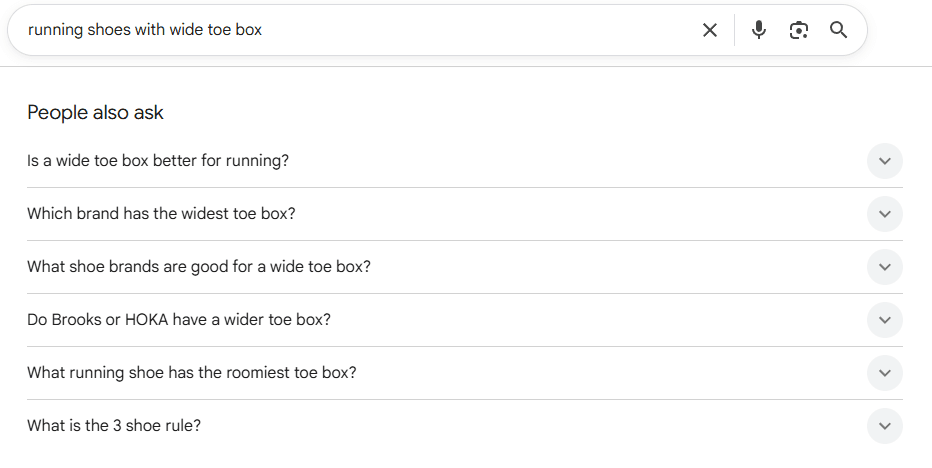
For a workflow, open a spreadsheet and create columns for the search phrase, the source (PAA or Related Searches), and a rough search intent tag (informational, commercial, navigational). A few hours of this on your top 10 seed keywords will produce a meaningful content map. Many of these questions will be long-tail phrases, which is a topic worth its own attention. See the long-tail keywords guide for how to prioritize them.
Method 3: Google Trends
Google Trends does not show you search volume. It shows you relative popularity over time, normalized on a 0-100 scale. That sounds limiting, but it answers questions no keyword tool does as well.
Use Trends to check:
- Is this topic rising or declining? A keyword with 1,000 monthly searches that is trending up is more valuable than one with 5,000 searches declining fast.
- Is this seasonal? "Halloween costume ideas" looks very different in July versus October. Trends makes that obvious.
- Which phrasing is more popular? Enter two keywords as comma-separated comparisons ("running shoes, jogging shoes") and Trends will show you which gets more search interest.
- Where is interest strongest? Geographic breakdowns matter for local and regional targeting.
Trends is strongest as a sanity check layered onto data from other sources. It is weakest when used alone because absolute volumes are invisible.
Method 4: Google Search Console (The Most Valuable Free Tool)
If you already have a website, Google Search Console is the single most useful free keyword research tool you have. It shows you the actual queries Google is matching your pages against, with real impression and click data.
The Performance report in Search Console breaks down your Google Search traffic across several dimensions (queries, pages, countries, and devices) and tracks impressions, clicks, CTR, and average position for each, as detailed in Google's Search Console performance data guide. This is first-party data from Google, and nothing else replaces it.
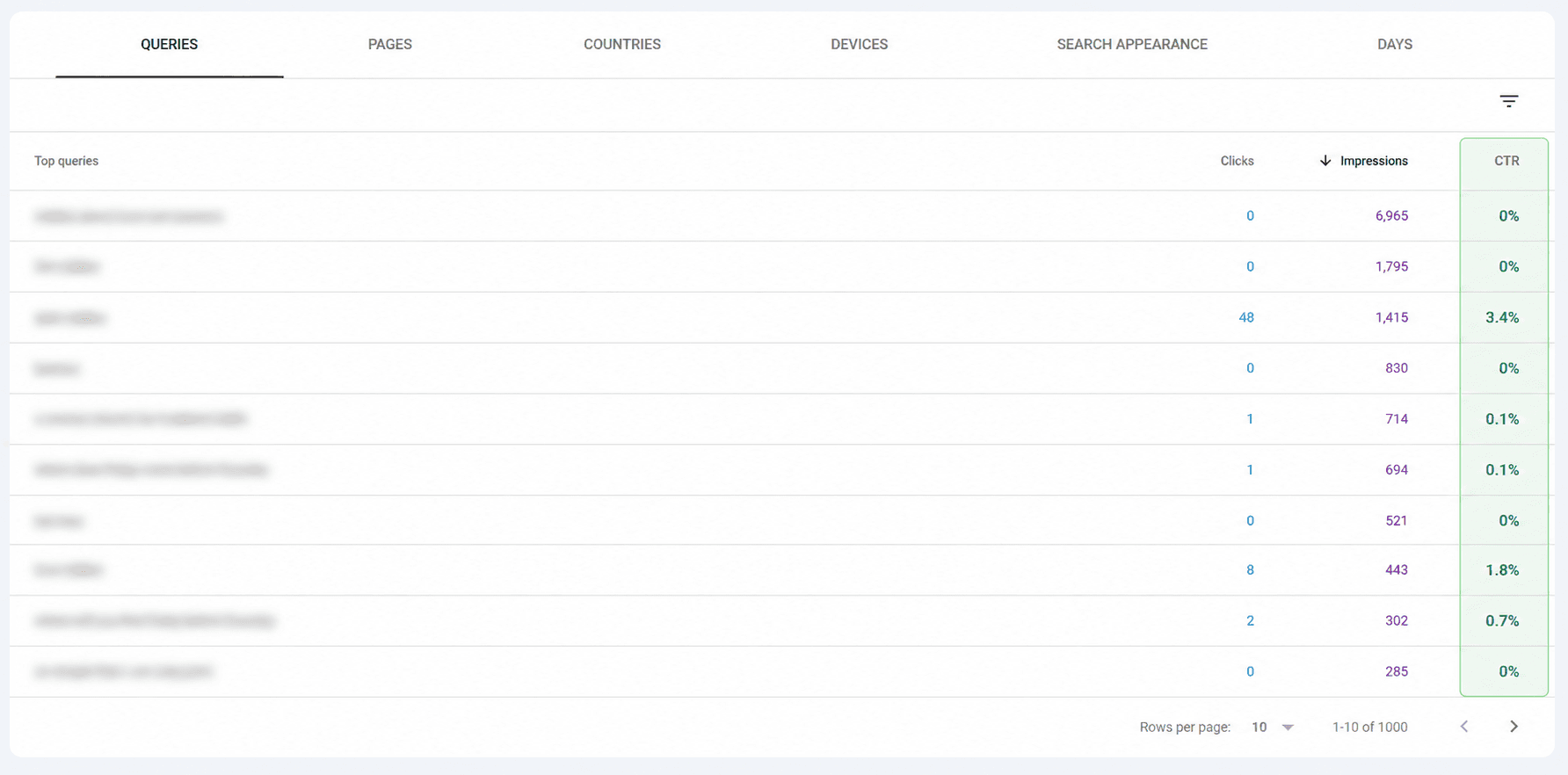
For keyword research specifically, four patterns in the Performance report are worth mining:
High-impression, low-click queries. Sort queries by impressions. Find ones with many impressions but few clicks. You are showing up in search results but not getting the click, often because you are not ranking high enough, or because your title and meta description do not match intent. These are existing opportunities where a page refresh or a dedicated article could convert visibility into traffic.
Queries where you rank position 11-20. Filter for queries with an average position just off page one. These are the easiest wins in all of SEO. A focused content update can often lift them onto page one without new link building.
Unexpected queries. Scan your query list for searches you never intended to rank for. These reveal how Google actually interprets your content. Sometimes they surface adjacent topic opportunities you would never have considered.
Query data has limitations. To protect user privacy, Search Console strips out "anonymized queries" from its reports. Per Google's own explanation, these are queries not issued by more than a few dozen users over a two-to-three month window. That means very long-tail queries may never appear in your reports, even if they bring traffic.
Method 5: Google Keyword Planner (With Caveats)
Google Keyword Planner is a tool inside Google Ads that offers keyword ideas and search volume data. It is technically free but practically limited.
To access it, you create a Google Ads account. You do not have to spend money, but you do have to add billing information. Inside the tool, you can either discover new keyword ideas from a seed term or website, or upload an existing list to pull volume data and forecasts.
The catch is search volume precision. As documented in Google Ads Help for Keyword Planner, without active ad spend Google shows volume in broad ranges: 10-100, 100-1K, 1K-10K, 10K-100K, 100K-1M. For a working ad account with meaningful spend, Google shows exact numbers. Most beginners will only ever see ranges.
Use Keyword Planner for:
- Generating keyword ideas from a seed or a URL
- Getting rough order-of-magnitude volume estimates
- Seeing which keywords Google considers related to your seed
- Understanding competition levels (note: this is ad competition, not SEO difficulty)
Do not use it for:
- Precise volume comparisons between keywords
- Keyword difficulty in an SEO sense
- Finding all long-tail variations (Keyword Planner is known to hide many)
Method 6: Free Third-Party Tools
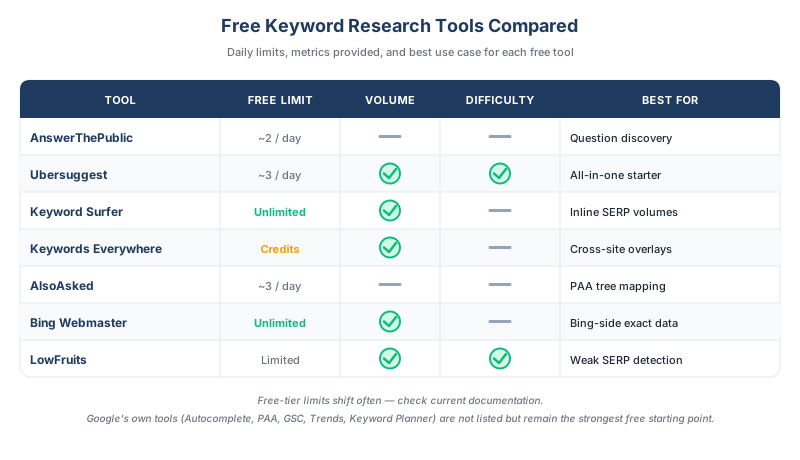
Beyond Google's own tools, several third-party tools have usable free tiers or free browser extensions (free-tier limits shift often, so check current documentation before relying on specific caps). None of them are as complete as their paid plans, but they extend what you can do.
AnswerThePublic visualizes question keywords around a seed. The free version caps daily searches but is excellent for content ideation.
Ubersuggest from Neil Patel offers a limited number of free searches per day with volume estimates and keyword suggestions. Volume accuracy varies.
Keyword Surfer is a free Chrome extension that shows estimated volumes and related keywords directly in Google search results. Good for quick checks while you browse SERPs.
Keywords Everywhere is a browser extension that overlays volume, CPC, and competition data on Google, YouTube, Amazon, and other sites. It runs on a paid credit model with inexpensive top-ups, rather than a fixed subscription.
AlsoAsked maps People Also Ask questions in tree diagrams so you can see how questions branch. Free tier allows a small number of searches per day.
Bing Webmaster Tools has a free keyword research feature built in. Data volume is lower than Google, but it is free and requires no ad spend to see exact numbers.
LowFruits specializes in finding keywords with weak top-ranking pages. The free tier is limited but useful for identifying low competition keywords.
The Complete Free Keyword Research Workflow
Here is how to stitch the methods together into a single session.
Step 1: Write your seed list. Five to ten broad topics. Put them in column A of a spreadsheet.
Step 2: Run each seed through Google Autocomplete. Use the alphabet soup technique. Record every relevant suggestion.
Step 3: Search each seed on Google. Expand the People Also Ask box, click to expand two or three levels deep, and record the questions. Scroll to the bottom and add Related Searches.
Step 4: Check Google Trends. Compare your top 5-10 candidate keywords. Drop keywords that are clearly declining. Note any seasonality patterns.
Step 5: Open Google Search Console (if you have an existing site). Export queries from the last 90 days. Sort by impressions. Highlight anything with many impressions but few clicks, or positions between 11 and 20.
Step 6: Run your top 20 candidates through Google Keyword Planner. Note the volume range and competition level for each.
Step 7: Check difficulty on 3-5 priority keywords. Use a free keyword difficulty tool or manually inspect the top 10 ranking pages, looking at domain authority, content depth, and backlink profile.
Step 8: Cluster and prioritize. Group related keywords, then rank them by a simple formula: estimated volume × likelihood you can rank ÷ estimated effort.
Step 9: Map keywords to content. Decide which keywords deserve new articles, which map to existing pages that need updates, and which are FAQ or subsection material.
The output of this workflow is a ranked keyword list, mapped to content. That is the real deliverable, and it is achievable entirely for free.
Limitations of Free Research (When to Invest in a Paid Tool)
Free methods hit a ceiling. Knowing when you have hit it saves you from wasting time.
Scale. When you are researching hundreds of keywords at once or managing dozens of content pieces, the manual nature of free methods becomes a real bottleneck. Paid tools cut research time by 5x or more.
Competitive analysis. Free tools can show you what your competitors rank for at a basic level, but proper competitor keyword analysis and keyword gap analysis need databases that free tools do not provide.
Precise difficulty scores. Free methods give you signals; paid tools give you algorithmic keyword difficulty scores calibrated against their backlink indexes. For making content investment decisions, the difference matters.
Historical data. Paid tools let you see search volume history going back years. Free tools mostly show current estimates.
A reasonable rule of thumb: if SEO is generating or expected to generate more than a few thousand dollars a month in value, a paid tool pays for itself. If you are below that, free is probably fine. Most small business SEO programs run comfortably on free tools for the first year.
When you are ready to scale, SEOForge's content planner handles discovery, clustering, and difficulty scoring in one pass, tailored to your ICP and business goals, then turns the shortlist into a full content plan, drafts the articles to SEO best practices, and can auto-publish them. Until then, the workflow above will get you further than you might expect.
Frequently Asked Questions
Is Google Keyword Planner really free?
Google Keyword Planner does not charge a subscription fee, but it requires a Google Ads account with billing information on file. Without active ad spend, you see search volume in broad ranges (for example, 1K-10K) rather than precise numbers. So it is free to access, but the most useful version of the data costs meaningful ad spend.
Can I do keyword research without any tools at all?
Yes, partially. Google Autocomplete, People Also Ask, and Related Searches on the results page itself are fully functional keyword research methods that require zero tools beyond a browser. You will miss search volume data and difficulty scores, but you can build a working list of real queries people are searching for.
What is the best free keyword research tool?
For existing sites with any traffic, Google Search Console is by a wide margin the most valuable free tool because it shows real queries Google is matching your pages against. For new sites without traffic yet, Google Autocomplete combined with People Also Ask gives the most useful starting dataset.
How accurate are free keyword research tools?
Directional accuracy is decent; precise accuracy is often weak. Free tools are good at showing you whether a keyword has substantial demand, is trending up or down, and what related queries look like. They are less reliable for exact monthly volume numbers and for rigorous difficulty scoring. For making major content investment decisions, triangulate across multiple sources.
When should I switch from free to paid keyword tools?
The practical triggers are scale and stakes. If you are researching more than 50 keywords per month, managing several content pieces at a time, or making six-figure content investments, the time savings and precision of paid tools justify the cost. If you are writing one or two blog posts a month for a new site, free is almost certainly enough.