
Keyword research tells you what people are searching for. Keyword mapping tells you which page on your site is going to earn that search. Without a map, most content programs drift: three blog posts end up competing for the same query, two pages optimize for terms with nearly identical meaning, and the content calendar fills up with topics that have no clear home in your site architecture.
This guide walks through a practical keyword mapping process you can execute in a spreadsheet, covering what to put in the document, how to handle edge cases (like pages that already exist for a term), and how to maintain the map as your site grows. It assumes you've already done the hard work of discovery and are ready to assign keywords to URLs. If you haven't, start with our keyword research guide first, then come back here.
In practice, a keyword map is the bridge between research and ranking. It's where abstract search data becomes a decision about what to publish, what to update, and what to leave alone.
Key Takeaways
- Keyword mapping is the assignment step, not the research step. It takes a finished keyword list and matches each term to a specific URL, either existing or planned.
- One primary keyword per page is the default rule. Pages can still target many secondary keywords, but the primary keyword anchors the page's purpose.
- The goal isn't avoiding cannibalization for its own sake. Google's own guidance suggests multiple pages ranking for one query is often fine. The real goal is making sure each page has a clear, distinct job.
- The map should live in a spreadsheet, not a strategy deck. Marketers need to filter it, sort it, and update it weekly, which means Google Sheets or Excel beats any prettier format.
- Maintenance matters more than the initial build. A keyword map is only valuable if it reflects the site as it exists today, not how it looked six months ago.
What Keyword Mapping Is (and What It Isn't)
Keyword mapping is the process of assigning target keywords to specific URLs on your site. Each URL gets one primary keyword, plus a set of supporting or secondary keywords that logically belong on the same page. The output is a document, usually a spreadsheet, that lists every target keyword next to the page responsible for ranking for it.
Three related activities often get confused with mapping, and it's worth separating them upfront:
| Activity | What It Does | Output |
|---|---|---|
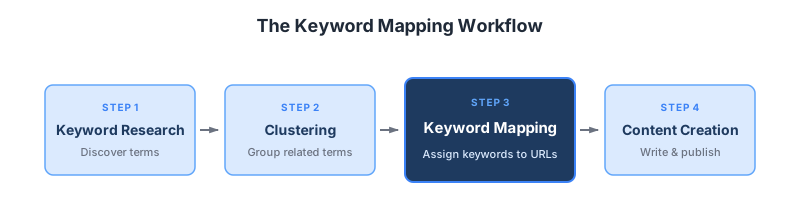
| Keyword research | Discovers which terms people search for | A list of keywords with volume, difficulty, intent |
| Keyword clustering | Groups keywords that should share a single page | A set of keyword groups |
| Keyword mapping | Assigns each cluster (or keyword) to a specific URL | A URL-to-keyword document |
You can do keyword research without clustering. You can cluster without mapping. But you can't map without the first two. Mapping sits at the end of the discovery phase and at the start of the content production phase. For a deep dive on the clustering step, see our guide on keyword clustering.
What mapping is not: it's not a one-time project. New pages get added, old pages get consolidated, intent shifts, and the map has to move with the site.
Why Keyword Mapping Matters
The benefits of keyword mapping are mostly about clarity. When every page has a clearly assigned primary keyword, three things get easier: deciding what to write, knowing how to optimize what already exists, and avoiding the slow drift into internal competition.
Strategic coverage
A map makes gaps visible. If you've clustered 400 keywords and assigned them to URLs, the terms with no URL assigned are your content backlog, prioritized by volume and difficulty. This is more useful than staring at a raw keyword list, because it tells you not just what to cover but whether you need a new page or can expand an existing one.
Cannibalization prevention, with nuance
The conventional wisdom is that keyword cannibalization, where multiple pages target the same query, automatically hurts rankings. That's overstated. Multiple pages from one site ranking for the same query isn't inherently a problem, and can even be an asset when each page answers a genuinely different need. The real damage comes from pages that are too thin, too duplicative, or too unfocused to earn their place, not from the mere fact of sharing a query.
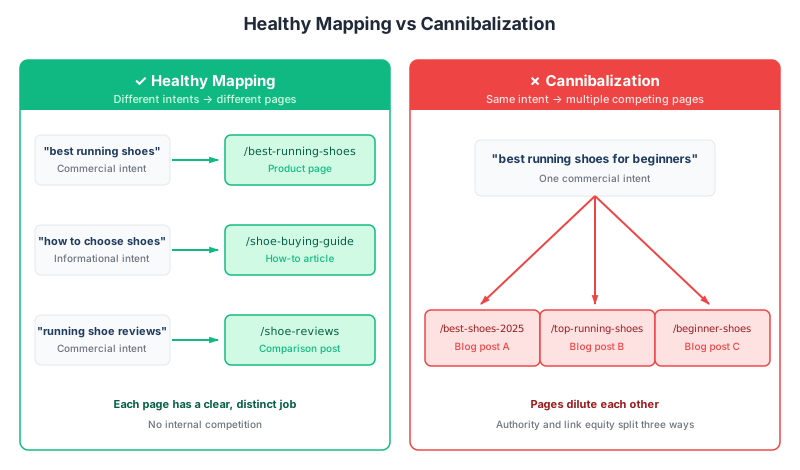
The distinction that matters is intent. When several pieces of content chase the same query with the same intent, they split the value you would otherwise concentrate on one strong page, and they end up competing with each other instead of with the rest of the SERP. When they serve different intents, they coexist comfortably. A product page, a how-to guide, and a comparison article can all rank for "best running shoes" without any of them hurting the others. Three nearly identical blog posts on "best running shoes for beginners" will cannibalize each other.
Mapping forces you to confront the question. Before you publish, you have to answer: which page owns this query, and why is that page distinct from everything else on the site?
Optimization prioritization
A keyword map tells you where the easiest wins live. Pages that already exist but aren't fully optimized for their assigned keyword are usually faster to improve than writing something new. The map surfaces those opportunities.
Visibility in AI answers
Clear one-page-per-intent mapping also helps answer engines. When a single page unambiguously owns a query, AI search systems like Google's AI Overviews and ChatGPT have an easier time identifying it as the authoritative source to cite, rather than splitting signals across several overlapping pages. The same focus that prevents cannibalization makes your content more citable for AI search optimization.
Before You Start: Prerequisites
A keyword map assumes two things are already in place:
- A finished keyword list. Ideally clustered, so you're mapping groups rather than individual terms. If you're starting from scratch, work through our step-by-step keyword research process before attempting to map.
- A content inventory. You need to know every URL on your site that currently exists or is planned. The easiest way to get this is to export your XML sitemap or run a crawl with a tool like Screaming Frog.
You don't need search volume, keyword difficulty, or intent data for every term, but having those columns in your map makes prioritization much faster. At minimum, capture: keyword, intent type, and current status.
The Keyword Mapping Process
Here's the process in six steps. It works for a site with 20 pages and a site with 2,000, though the tools and level of automation scale up.
Step 1: Export Your Keyword List
Start with the keyword list from your research phase. If you've clustered keywords, each row should represent one cluster with a designated primary keyword and the secondary keywords that belong with it. If you haven't clustered yet, group obviously-similar terms manually before continuing. Pages rank for many long-tail variations of a query, so you don't need to map every variation separately.
Step 2: Inventory Your Existing Pages
Pull a list of every indexable URL on your site. A sitemap export is the fastest source, but Google Search Console's Pages report will also work. For each URL, note the page title and a one-line description of what the page is actually about. You'll use this in the next step.
Step 3: Match Keywords to Existing Pages
Go through your keyword list and ask, for each cluster: is there an existing page that already targets this intent? If yes, assign the keyword to that URL. If the page needs optimization to actually rank (maybe it mentions the term in passing but isn't built around it), note that in the status column as "optimize."
Be strict in this step. A page that touches on a topic isn't the same as a page built for it. If your existing "SEO for beginners" post mentions keyword research in one paragraph, that's not a match for the keyword "how to do keyword research." That deserves its own page.
Step 4: Identify Content Gaps
Any keyword cluster that has no existing page to claim it is a content gap — the core output of keyword gap analysis. Flag these as "to create" in the status column. This is now your prioritized backlog. The highest-volume, lowest-difficulty gaps should usually be built first, though business relevance matters just as much as the numbers.
What most guides miss at this step: not every keyword deserves a page. If a term has 20 monthly searches and no commercial value, it's probably fine as a secondary keyword on an existing page, or not covered at all. Mapping isn't about filling every row.
Step 5: Flag Consolidation Candidates
Sometimes the inventory reveals the opposite problem: two or three existing pages all targeting similar intents. This is the real cannibalization risk. Mark these pages for review, and make a call about whether to consolidate them (usually the strongest performer absorbs the others via 301 redirect), re-focus each one on a distinct angle, or leave them alone if they genuinely serve different needs.
Step 6: Document and Share
Save the map somewhere your team can access it, update it, and reference it during content production. Google Sheets works well because it's easy to filter, comment on, and link to. Lock down editing rights so the map stays coherent, and assign an owner responsible for keeping it current.
Anatomy of a Keyword Map: Document Structure
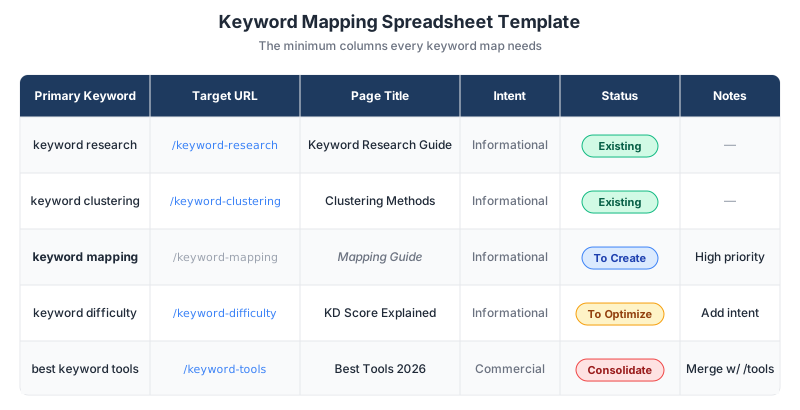
A keyword map doesn't need to be elaborate. A spreadsheet with the following columns covers most situations:
| Column | Purpose |
|---|---|
| Primary Keyword | The main term the page should rank for |
| Secondary Keywords | Related terms the page should also cover |
| Target URL | Existing URL, or planned slug if the page doesn't exist yet |
| Page Title | The H1 / title tag, either current or planned |
| Search Intent | Informational, commercial, navigational, transactional |
| Volume | Monthly search volume (from your keyword tool) |
| Difficulty | Keyword difficulty score (optional but useful for prioritization) |
| Status | Existing, To Optimize, To Create, Consolidate |
| Notes | Context, dependencies, or optimization needs |
| Last Updated | Date of last review |
The "Status" column is where the map becomes actionable. Filter by "To Create" and you have your editorial calendar. Filter by "To Optimize" and you have an on-page SEO to-do list. Filter by "Consolidate" and you have a content pruning project.
For sites with hundreds or thousands of pages, manual mapping becomes impractical, but today's AI models can handle a lot of the bulk analysis. And if you're a brand-new site building your content plan and keyword map from the ground up, SEOForge's content planner does the semantic mapping for you, so you start with a structured map instead of a blank spreadsheet.
Free Keyword Map Template
A ready-to-use spreadsheet with the exact columns from this guide, including dropdowns, color-coded statuses, and example rows to get you started.
One email. No spam. Unsubscribe anytime. Privacy policy.
Handling Edge Cases
A clean keyword map is rare. Most sites have at least a few situations that don't fit neatly into the template.
Multiple pages competing for the same keyword
The first question is whether they actually serve the same intent. If a product page and a how-to guide both rank for "running shoes," that's often fine because they satisfy different users. If two blog posts both try to be the definitive "best running shoes for beginners" guide, that's a real problem.
When pages do need to be consolidated, the process is usually: pick the stronger performer (more traffic, more backlinks, better engagement), merge the useful content from the weaker pages into it, then 301 redirect the old URLs to the consolidated page. Google Search Central documents the proper implementation for site moves and consolidations.
Keywords with no good existing page match
These are your content gaps. Create a planned URL (a slug you'd use if the page existed) and add it to the map with status "To Create." Prioritize these based on volume, difficulty, and business relevance, not just by how interesting the topic feels.
Pages with no target keyword
Not every page on your site needs a target keyword. Legal pages, about pages, contact pages, and internal tools often don't need to rank for anything. Leave them out of the map rather than forcing a weak keyword onto them.
New page creation triggers
Add a new page to the map (as "To Create") when: a high-value keyword cluster has no existing home; an existing page is trying to cover too many distinct intents and needs to be split; or a consolidation decision shows that the site is missing a clear resource on a topic.
Maintaining Your Keyword Map
The initial build is maybe 20% of the work. Maintenance is the other 80%.
Update the map whenever you publish a new page, retire an existing one, or notice ranking shifts. A quick monthly review catches most drift: scan the status column, update "Last Updated" dates, and re-check any rows where the target URL or keyword might have moved.
Re-clustering and re-mapping every 6 to 12 months is also worth the time. Search intent shifts (sometimes subtly), competitor content changes what's required to rank, and your own site's authority grows or changes. A term that was out of reach a year ago may be attainable now, and vice versa. The map should evolve with the search landscape.
One useful practice: tie your keyword map to your internal linking workflow. When you publish a new page, check the map for sibling content that should link to it, and for older content that now has a natural link target. This small discipline pays off over time by reinforcing topical clusters through internal linking.
Where Keyword Maps Break Down
Mapping every page. Not every URL on your site has ranking potential, and not every keyword deserves a home. Focus the map on pages that matter for organic traffic, and accept that large chunks of your site legitimately fall outside it.
Ignoring search intent. Two keywords with the same volume can have completely different intents, and putting them on the same page almost always fails. Before assigning a keyword to a URL, confirm the intent type matches what the page delivers. Our guide to search intent covers the four main types and how to identify them.
Treating the map as a strategy deck. A keyword map isn't a presentation artifact. It's a working document used daily by writers, editors, and SEO leads. Optimize for filter speed, not visual polish.
Forgetting about site structure. A good keyword map aligns with a good site hierarchy. If your map assigns related terms to pages scattered across unrelated sections of the site, internal linking and topical authority will suffer. Map and site architecture decisions should inform each other.
Skipping the gap analysis. The map's most valuable output is often the list of keywords with no assigned URL. Teams that only map existing pages miss the biggest opportunity: seeing what they haven't built yet.
Frequently Asked Questions
What's the difference between keyword mapping and keyword clustering?
Keyword clustering groups related keywords that can share a single page, based on SERP overlap or semantic similarity. Keyword mapping takes those clusters and assigns each one to a specific URL on your site. Clustering is the grouping step; mapping is the assignment step. You typically cluster first, then map.
Does every page need a target keyword?
No. Pages like contact forms, legal pages, account settings, and internal tools don't need to rank in search and don't need to be in your keyword map. Focus mapping on pages that have organic traffic potential and skip the rest.
How often should I update my keyword map?
Touch it whenever you publish new content, retire a page, or notice a major ranking change. A quick monthly review catches drift, and a more thorough re-mapping every 6 to 12 months keeps the map aligned with how search intent and your site have evolved.
Is keyword cannibalization really a problem?
Sometimes, but the conventional wisdom overstates it. Multiple pages ranking for the same query isn't inherently problematic, and can even help when each page serves a distinct user need. Cannibalization becomes a real issue only when pages target the same intent with substantially overlapping content. If your pages have clearly different jobs, sharing keywords is fine.
What tool should I use to build a keyword map?
For most teams, a Google Sheet or Excel file works fine. It's filterable, shareable, and easy to update. Larger sites may benefit from a dedicated platform that integrates keyword research, clustering, and mapping into one workflow, which removes much of the manual matching work. The right tool is whichever one your team will actually maintain.