
Keyword research is the work of figuring out what your audience actually types into Google (and increasingly, types into ChatGPT or Perplexity) so you can build pages that match those searches. Done well, it tells you what to publish, in what order, and what realistic results to expect. Done poorly, it produces content nobody finds and nobody reads.
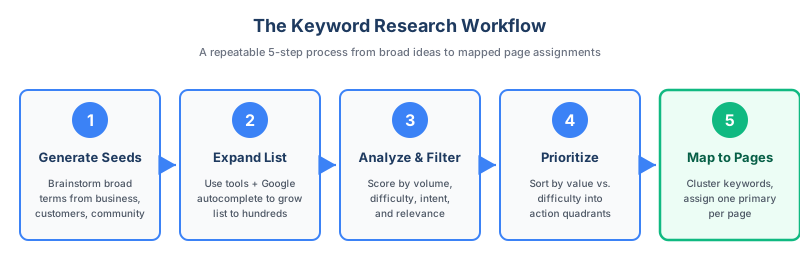
This guide walks through a repeatable 5-step process you can run end to end, even without a paid SEO tool. By the end, you'll have a working keyword list, a sense of which terms are worth pursuing first, and a clear way to map keywords to specific pages. Given that the top organic result on Google receives around 28% of clicks and traffic drops off sharply from there, targeting keywords you can realistically rank for is essential. The steps below are the hands-on execution of a broader keyword research strategy, which frames where this work fits inside a full SEO program.
Key Takeaways
- Keyword research is a 5-step workflow: generate seed keywords, expand them with tools, analyze and filter the list, prioritize by opportunity, then map keywords to pages. Skipping a step usually shows up later as wasted content.
- Search intent matters more than search volume. A high-volume keyword you can't realistically satisfy is worse than a lower-volume keyword that matches a page you can actually build.
- Long-tail keywords carry most of the demand. Ahrefs' analysis of its US database found that keywords with fewer than 10 monthly searches make up roughly 95% of all queries.
- Difficulty is your reality check. Most new sites should target keyword difficulty scores under about 30 to have a realistic chance of ranking within 3 to 6 months.
- One primary keyword per page. Multiple pages targeting the same query cannibalize each other and dilute ranking signals.
- AI search rewards the same fundamentals. Conversational, question-based keywords map well to how people prompt ChatGPT, Perplexity, and Google AI Overviews.
Before You Start: What You'll Need
You don't need an expensive tool stack to do keyword research. Paid tools mainly buy you speed and scale, expanding seed lists faster and layering on volume and difficulty data, but the process itself works the same whether you have a paid stack or only free tools. You only need:
- Google access, for autocomplete, "People also ask," and related searches
- A free Google Search Console property, if your site already exists, to see the queries you already get impressions for
- One keyword research tool to pull search volume and difficulty estimates; if you don't have a paid one, Google Keyword Planner is free
- A spreadsheet (Google Sheets or Excel) to track keywords, metrics, and decisions
If you only have free options, our guide to free keyword research walks through which tools to combine.
Plan for a few hours of focused work on a small site or a single content cluster. Larger projects spread across weeks, not days, because the analysis and prioritization steps reward thinking time.
Step 1: Generate Seed Keywords
Seed keywords are the broad terms that describe what you do. They're not the keywords you'll target directly. They're starting points that tools will expand into hundreds or thousands of variations in Step 2.
Pull seed keywords from four sources:
Your own business. List your products, services, categories, and the problems you solve. A bookkeeping software company might start with: bookkeeping, accounting software, small business accounting, expense tracking, invoicing.
Customer language. Look at how customers actually describe what you do, which is rarely how you describe it internally. Sales call transcripts, support tickets, product reviews, and onboarding survey responses are gold here. If a customer says "I needed a way to stop chasing receipts," that's a phrase your prospects probably search for too.
Community research. Reddit, Quora, and niche forums show you how real people phrase their problems. Search your topic on Reddit and skim the post titles. The exact wording often becomes a keyword you'd never have brainstormed at your desk.
Competitor topics. Visit two or three competitors' blog category pages and skim the topics they publish on. You're looking for themes, not specific titles to copy. For a more systematic approach, see our guide to competitor keyword analysis.
Aim for 10 to 20 seed keywords. More than that becomes unwieldy in Step 2. Don't worry yet about whether anyone searches for these terms; you'll filter for that next.
Step 2: Expand Seed Keywords Into a Full List
This is where seed keywords turn into hundreds of real candidates. Plug each seed into a keyword tool and pull every variation it returns.
Most tools offer several useful reports:
- Matching terms or "all keyword ideas": every variation that contains your seed
- Related keywords: semantically similar terms that may not contain your seed word (often called LSI or semantic keywords)
- Questions: queries phrased as questions, especially useful for blog content
- Also rank for: other keywords that pages ranking for your seed already rank for
Run all four for each seed if your tool supports them. Export the results into your spreadsheet.
Then layer in two free sources tools tend to miss:
Google autocomplete. Type your seed into Google and note the dropdown suggestions. Add a letter (a, b, c) after the seed for more variations. These are real searches Google's seen recently.
"People also ask" and "Related searches." After running a Google search for your seed, scan the PAA box and the related searches at the bottom of the page. These surface adjacent queries that often have lower competition than the head term.
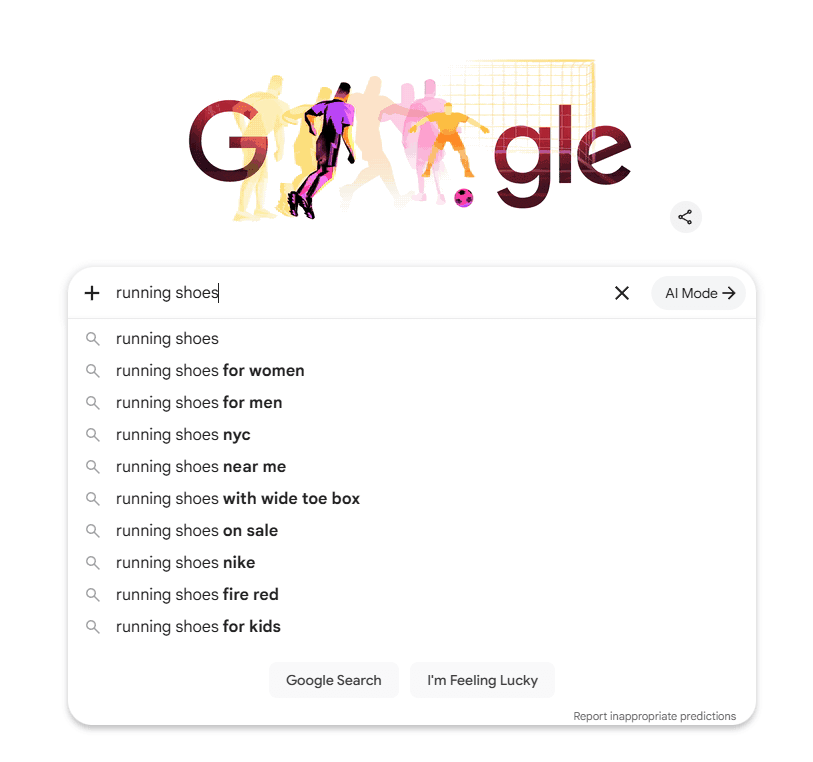
A note on long-tail keywords. These are queries with low individual search volume that collectively account for the bulk of all searches. Ahrefs' analysis of its US keyword database found roughly 31,000 keywords with more than 100,000 monthly searches, while 3.8 billion keywords get fewer than 10 searches per month. The lopsidedness matters: chasing only the head terms means competing for a sliver of demand against the largest sites in your space. Our guide to long-tail keywords goes deeper on how to use them.
For AI search, long-tail and question-shaped keywords are particularly important. People prompt ChatGPT and Perplexity in full sentences ("what's the best way to track expenses for a freelance designer") rather than typed shorthand ("expense tracker freelance"). Both formulations should end up in your list.
By the end of Step 2, expect a working list of a few hundred to a few thousand keywords. That's normal. Step 3 narrows it.
Step 3: Analyze and Filter
You now have a long, mostly-irrelevant list. The goal of this step is to cut it down to keywords that are realistic, relevant, and worth the effort.
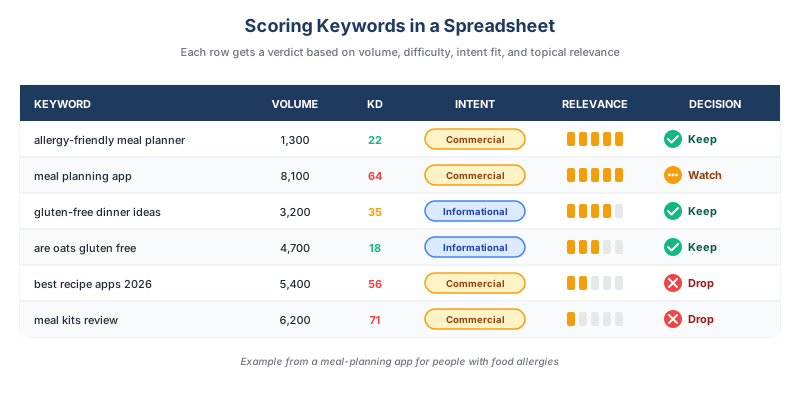
Score each keyword on four dimensions.
Search Volume
Volume tells you roughly how many people search for a term each month. Tool estimates are imprecise, often differing by 50% or more between providers, so treat them as relative rather than absolute. A keyword with an estimated 50 searches isn't worthless if it's highly relevant; a keyword with 50,000 searches isn't valuable if it doesn't fit your business.
A practical filter for early-stage sites: keep anything with at least 10 monthly searches and obvious topical relevance. You can always raise the floor later.
Keyword Difficulty
Most tools assign a keyword difficulty (KD) score, usually 0 to 100, that estimates how hard it is to rank on page one. Different tools calculate this differently, so don't compare scores across providers. Within a single tool, lower is easier.
For new or low-authority sites, target keywords with KD under about 30. Mid-authority sites can comfortably push into the 30 to 50 range. Above 60, you're competing with established sites that have years of content and thousands of backlinks behind them. If you don't have a tool that reports KD, you can approximate it from the SERP itself: search the keyword and judge how established the page-one results are. A first page dominated by major brands with deep backlink profiles is hard whatever a score says; one with forum threads, thin pages, or low-authority domains is more winnable. For a deeper explanation, see our breakdown of keyword difficulty.
Search Intent
Intent is what the searcher actually wants. The standard categories are:
- Informational: "how to do keyword research" (this article)
- Navigational: "seoforge login"
- Commercial: "best keyword research tools"
- Transactional: "buy seoforge subscription"
You can read intent two ways, and they complement each other. Most keyword tools now classify intent directly in the export, tagging each query against these categories, which gives you a fast first pass across a large list. Treat those labels as a starting point rather than the final word: the reliable check is to search the keyword and look at the top 10 results, a practice known as SERP analysis. If the SERP is full of how-to guides, it's informational; if it's product pages and comparison posts, it's commercial or transactional. If your page format doesn't match what's already ranking, you're unlikely to rank no matter how well-written your content is. Google's own SEO guidance reinforces that content should match what users are looking for. Our guide to search intent covers this in more detail.
Relevance
The hardest filter to apply, and the most important. Ask: can the page I'd build for this keyword realistically convert into a customer or contribute to that path? A bookkeeping company might rank for "how to read a financial statement," but if it doesn't lead anywhere useful for prospects, it's a poor use of effort.
Drop anything that fails the relevance test, even if the volume is appealing.
Step 4: Prioritize Your Shortlist
After Step 3, you should have anywhere from 50 to a few hundred keywords worth considering. Prioritization decides what gets written first.
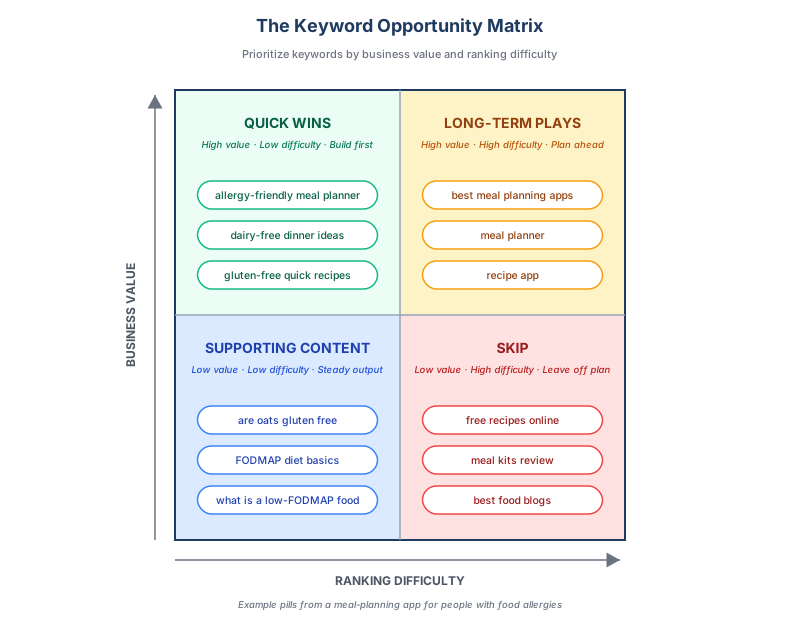
Use a simple two-axis matrix: business value on one axis, ranking difficulty on the other.
Quick wins (high value, low difficulty). Build these first. They're the keywords closest to your money pages or service pages, with KD low enough to rank on within a few months. These are often called low competition keywords, and even a small number of them can change the trajectory of a new site.
Long-term plays (high value, high difficulty). Plan these but don't lead with them. Head terms like "project management software" or "best CRM" rank only after you've built topical authority through dozens of supporting articles. Block them off as eventual targets and revisit each quarter.
Supporting content (low value, low difficulty). These are the topical-authority builders, often informational queries that don't convert directly but help search engines (and AI search systems) understand the breadth of what you cover. Publish steadily, but don't prioritize them over quick wins.
Skip (low value, high difficulty). The graveyard. If a keyword falls here, leave it off the plan.
A useful sanity check: Ahrefs' study of around 14 billion pages found that 96.55% of all pages get no organic search traffic from Google. Most of those pages target keywords that were too competitive, too irrelevant, or both. Disciplined prioritization is the difference between contributing to that statistic and ranking.
Step 5: Map Keywords to Pages
The final step turns your prioritized list into an action plan: which keyword goes on which page, a stage known as keyword mapping.
The rule is simple: one primary keyword per page. Each page should target a single primary query plus related secondary keywords that share the same intent. Two pages targeting the same primary keyword will compete with each other in the SERP, a problem called keyword cannibalization that splits ranking signals between pages instead of consolidating them.
Group related keywords together. Keywords like "how to do keyword research," "keyword research process," and "steps for keyword research" all share the same intent and should live on the same page (this one). Keyword clustering tools automate this grouping at scale; for a more thorough treatment, see our guide to keyword clustering.
For each cluster, decide:
- Page type: blog post, landing page, product page, comparison page
- Primary keyword: the single query the page targets
- Secondary keywords: 3 to 8 related queries the page should also cover
- Existing or new: does this fit an existing page, or do you need to publish something new?
Document the decisions in your spreadsheet. The output is a content roadmap, ordered by priority, that anyone on your team can execute against.
If you want to skip the manual workflow, SEOForge's content planner handles seed expansion, clustering, and prioritization, then turns the shortlist into a full content plan and drafts the articles to SEO best practices.
Keyword Research Worksheet
The full 5-step process in one spreadsheet, with dropdowns, a built-in priority matrix, and worked examples. Capture seeds, score and filter, then map keywords to pages.
One email. No spam. Unsubscribe anytime. Privacy policy.
A Practical Workflow Example
Here's what the full process looks like for a fictional small business: a meal-planning app for people with food allergies.
- Seeds: "meal planning," "food allergy," "allergy-friendly recipes," "gluten-free meal plan," "dairy-free dinner ideas." Pulled from product features and Reddit threads in r/FoodAllergies.
- Expansion: Each seed run through a keyword tool plus Google autocomplete. The list grows to about 800 keywords.
- Filtering: Anything below 10 monthly searches, above KD 50, or unrelated to meal planning gets cut. The list drops to 120 candidates.
- Prioritization: "Allergy-friendly meal planning app" (low volume, high commercial intent, KD 22) goes into quick wins. "Best meal planning apps" (high volume, KD 62) becomes a long-term play. "Are oats gluten-free?" (medium volume, KD 18, informational) becomes supporting content.
- Mapping: 120 keywords cluster into about 25 page topics. The first 8 to publish are picked based on the priority matrix. The rest go into a backlog.
Run end to end, this produces a quarter's worth of prioritized content work.
Where Keyword Research Falls Apart
- Targeting volume without intent. A high-volume keyword you can't satisfy with the type of page you'd build is worse than no keyword at all.
- Skipping the SERP check. Tool metrics don't capture everything. Searching the keyword and reading what currently ranks tells you what Google thinks the user wants.
- Treating tool data as truth. Volume and difficulty estimates vary substantially between tools and are best used as directional, not absolute.
- Ignoring AI search behavior. If your audience is increasingly using ChatGPT and Perplexity for research, your keyword list should include conversational, question-shaped queries alongside traditional short-form ones.
- Not documenting decisions. A keyword list without a spreadsheet (or equivalent) becomes hard to maintain. Six months in, you'll forget why you made certain calls.
- Trying to do everything at once. Pick a small content cluster and run the full process end-to-end before scaling.
What to Do Next
Once you have a mapped keyword list, the next step is creating content that actually satisfies the intent behind those keywords. Google's guidance on helpful, people-first content is worth reading before you draft.
Plan to revisit your keyword research at least once a quarter. Search behavior shifts, new competitors enter, and AI search platforms continue to change how people find information. The list you build today is a starting point, not a finished plan.
Frequently Asked Questions
How long should keyword research take?
For a small site or single content cluster, plan on 2 to 4 hours of focused work. Larger projects, especially those covering multiple service areas or content clusters, can span several weeks. The analysis and prioritization steps benefit from time to think, so don't try to compress everything into one sitting.
How many keywords should I target per page?
One primary keyword and 3 to 8 closely related secondary keywords that share the same search intent. Targeting more than that on a single page typically dilutes focus, and creating multiple pages for the same primary keyword causes cannibalization.
Can I do keyword research without paid tools?
Yes. The combination of Google Search Console (for keywords your site already gets impressions on), Google autocomplete, "People also ask," and a free keyword research tool will get most small sites through the process. You'll have less data and slower workflows than with a paid tool, but the methodology is the same.
How do I know if a keyword is too competitive?
Check the keyword difficulty score in your tool of choice and compare it to your domain's authority. As a rough guide, new or low-authority sites should target keywords with KD under 30. Beyond that, look at who's currently ranking on page one. If it's all major brands with hundreds of backlinks, the keyword is likely out of reach for now.
Does keyword research still matter for AI search like ChatGPT?
Yes, but the kinds of keywords that matter shift slightly. AI search platforms reward conversational, question-shaped queries because that's how people prompt them. Long-tail keywords and question keywords are especially relevant. The underlying process of identifying what your audience asks doesn't change.